Sales
Field Sales Automation in 2026: How AI Changes the Field Sales Rep's Day
Every week, a field sales team has hundreds of customer conversations that never reach the rest of the business. A buyer mentions a competitor's quote. A plant manager explains why a project slipped. A purchasing lead names a requirement nobody wrote down. The field sales rep hears it, drives to the next visit, and by Friday most of it is gone.
Field sales automation used to mean optimized routes and proof that field sales reps were where they said they'd be. In 2026 the more useful question is what each visit produces, and whether it improves the next visit, the next coaching conversation and, most importantly, the next business decision. AI sales tools built for people on the road now take on much of the admin work around each visit, from meeting preparation to capturing the conversation, and the sales admin that follows.
This guide covers what field sales automation includes, what to automate first, how AI changes the rep's day, and how field sales leaders turn the time it frees up into sales productivity and revenue. The examples come from field sales teams using Donna, the only proactive AI assistant for field sales.
What is field sales automation?
Field sales automation is the use of software to take manual data entry and other repetitive work off field sales reps and outside sales teams, and to turn their customer visits into sales data the business can act on. It covers planning visits, preparing for meetings, capturing what happened, keeping CRM records up to date and following up, and in 2026 it increasingly returns what was learned to managers as coaching and to the business as field intelligence.
It's a broad label. A route planner, a retail execution app and AI-powered field sales software can all claim it, which is why five vendors give you five definitions. The comparison and the five layers below make it easier to see what each kind of sales tool does.
Field sales automation vs CRM vs sales force automation
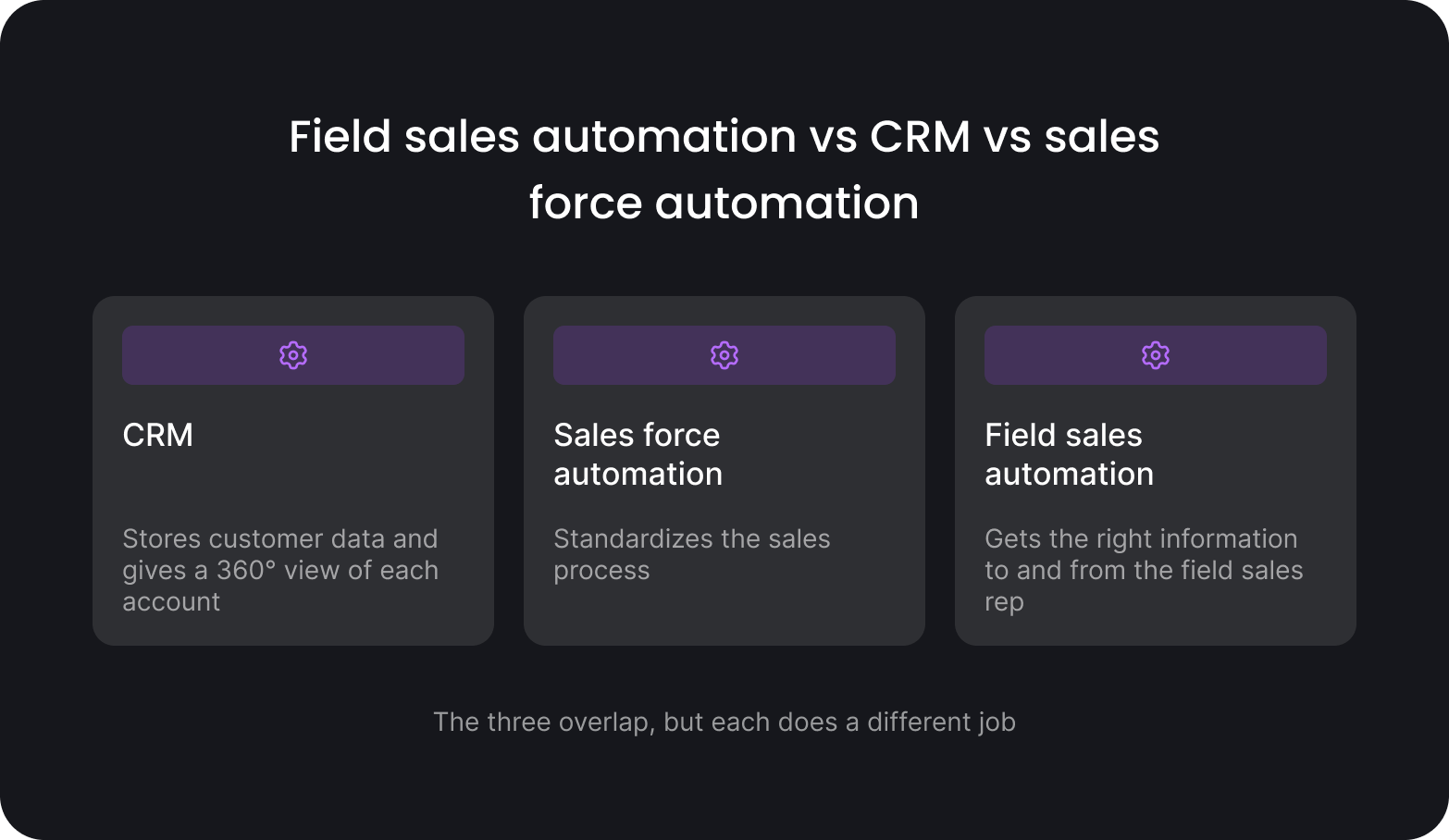
Field sales automation is often confused with the CRM and with sales force automation. The three overlap, but each does a different job:
Field sales automation doesn't replace the CRM. It feeds it. A traditional CRM stores what's entered into it and gives the field sales rep and their manager a 360° view of every account. For field teams, most of what matters is said in a customer's office or on a plant floor, so the value depends on how much of it reaches the CRM, and how quickly.
That's why CRM adoption and data quality are usually the first problems field sales automation is asked to solve.
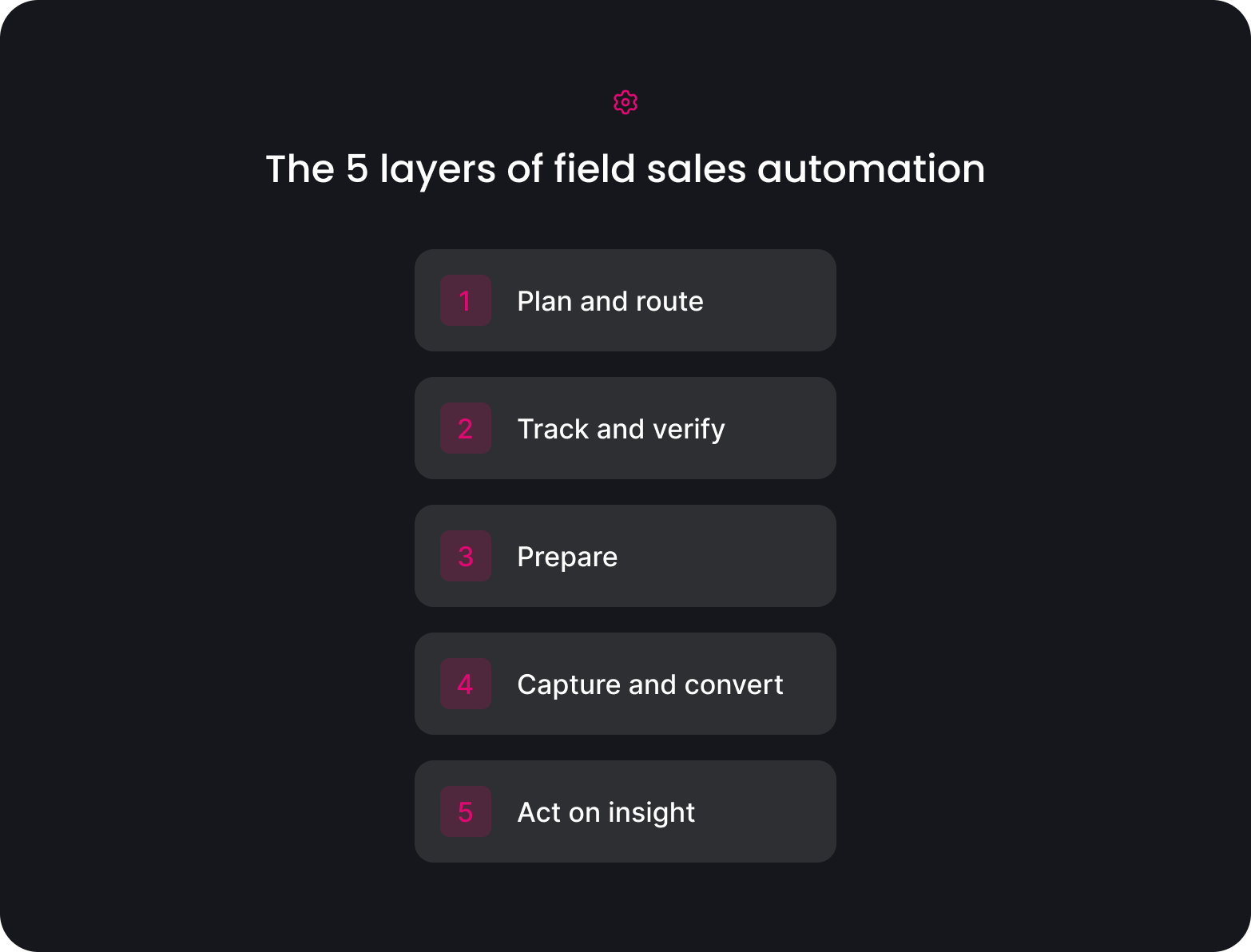
The five layers of field sales automation
Most of the confusion disappears once you split field sales automation into five layers. Each one automates different work, for different people:
Layers 1 and 2 make visits efficient. Layers 3 to 5 make them count. Traditional outside sales automation lives mostly in the first two. AI-powered tools for field sales are changing the last three, and that's where the exchange between field sales reps and their leaders either works or breaks down. Layer 5 is where captured visits become proactive pipeline management for managers, who see stalled deals before the forecast call, and field intelligence for the business, such as a competitor's new pricing heard across several regions.
Why field sales automation matters in 2026
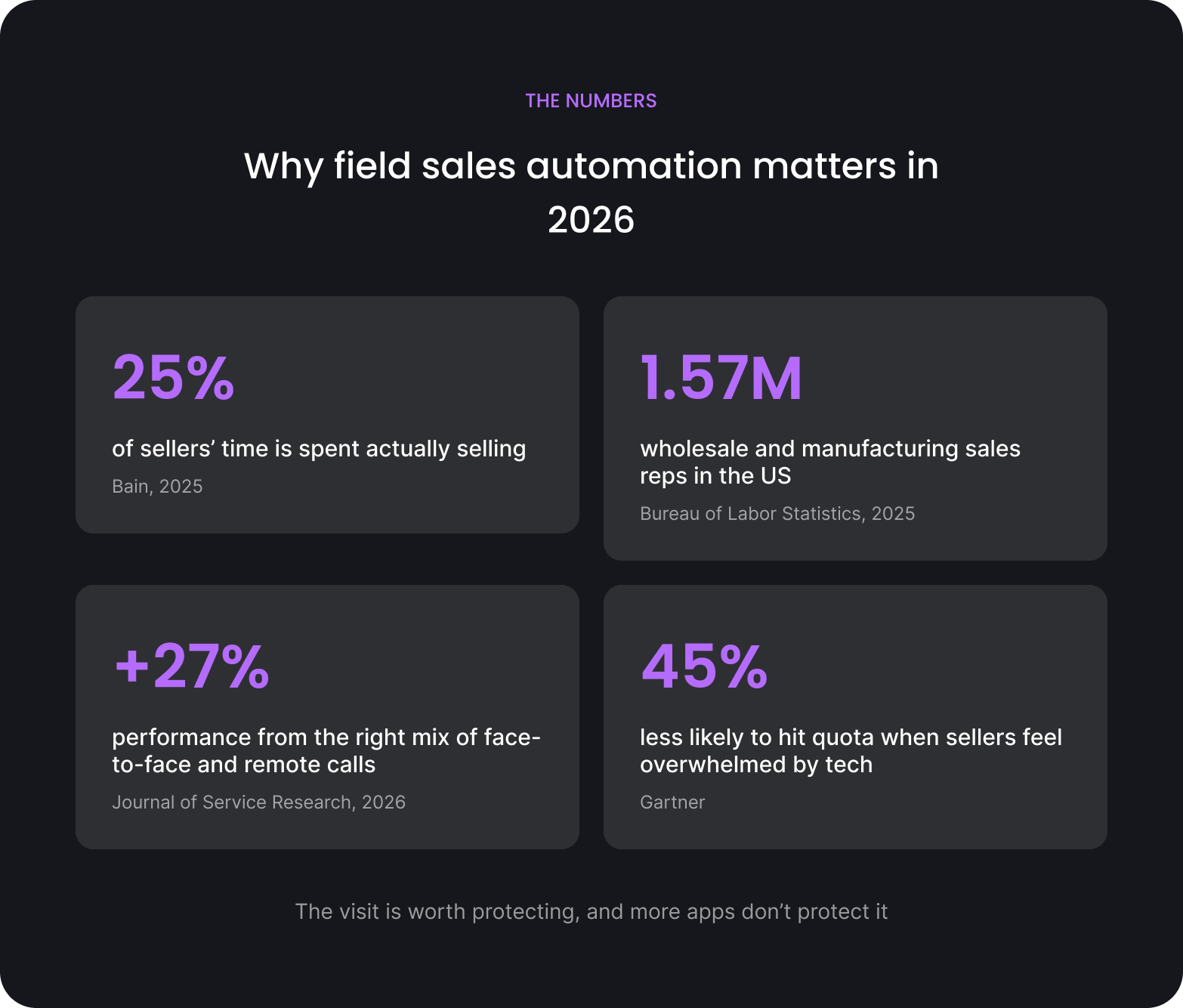
Selling time is still scarce. Bain's 2025 technology report estimates that sellers may spend only about 25% of their time actually selling, and that AI could double that by taking on much of the work around selling. The scale is large: in the US alone, the Bureau of Labor Statistics counts 1,571,400 wholesale and manufacturing sales representatives (2025), and notes that outside sales representatives "spend much of their time traveling to and visiting with current clients and prospective buyers."
The visit is worth protecting. A 2026 study in the Journal of Service Research analyzed CRM data from 3,565 B2B customers and 15,172 interactions. The best mix of face-to-face and remote calls lifted performance by up to 27% in some contexts, while a purely remote approach reduced it by up to 32% in others. The same research found that the salesperson's knowledge of the customer's past interactions shapes relationship quality. In-person selling pays, and it pays more when the field sales rep walks in knowing what happened last time.
More apps don't help. Gartner's survey of 1,026 B2B sellers found that 50% feel overwhelmed by the amount of technology their role requires, and overwhelmed sellers are 45% less likely to attain quota. Automation that adds another screen to check, or another set of sales tools to learn, can cost more than it saves.
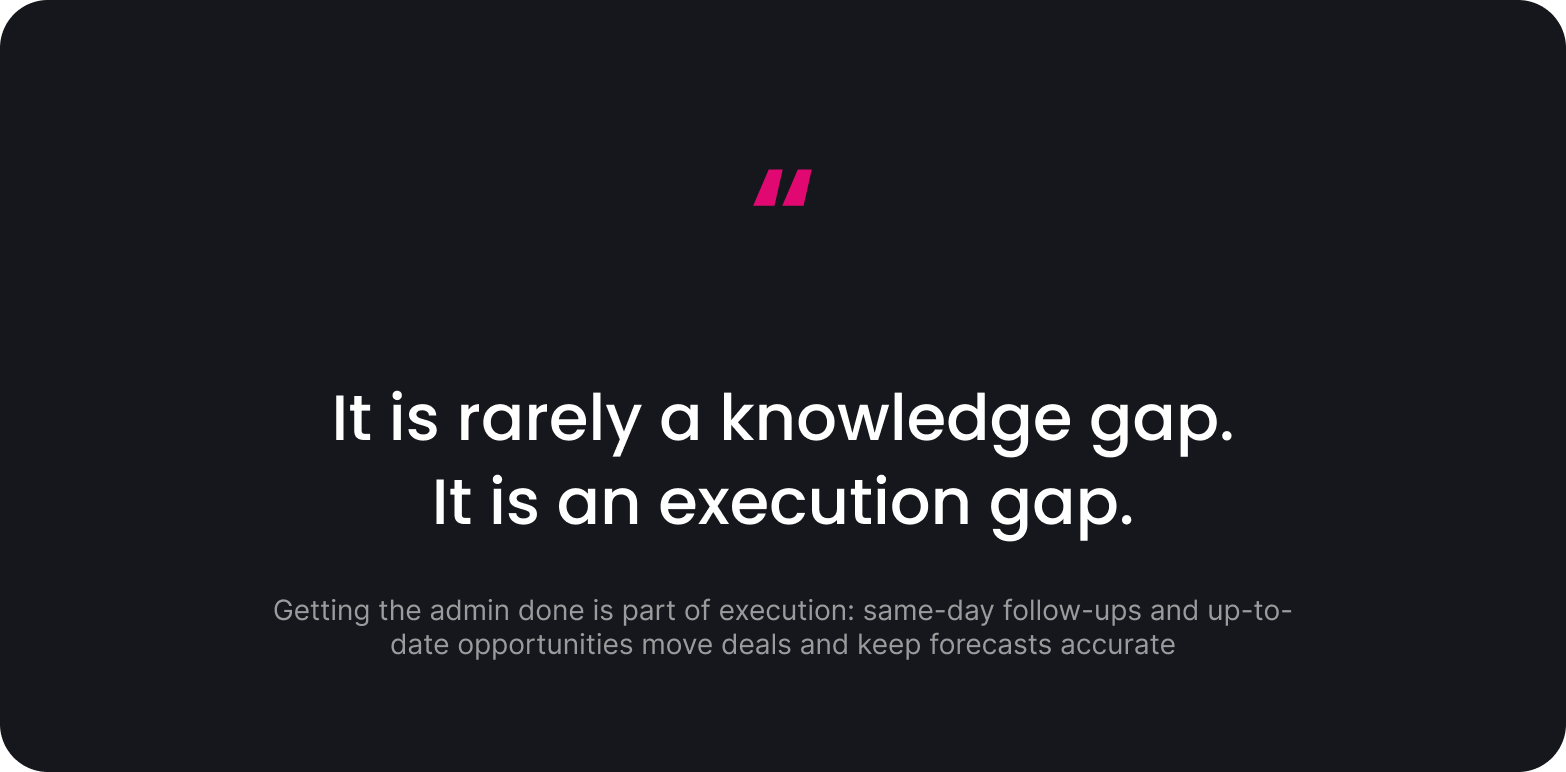
The bigger opportunity is execution. In most field sales organizations, the gap between the best field sales rep and the median one is the largest source of lost revenue. It is rarely a knowledge gap. It is an execution gap. Managers coach on what they caught on a ride-along, follow-ups go out days late, CRM fields get filled from memory, and the best answer to a tough objection lives in one person's head. Getting the admin done is part of execution: a follow-up sent the same day and an opportunity updated with its value and close date move the deal forward, keep the forecast accurate and give managers real conversations to coach on.
The loop between field sales leaders and field sales reps
Field sales performance is shaped in two places: in front of the customer, and in the conversations between field sales reps and their managers. Leaders decide which accounts matter, what good looks like and where to coach. Field sales reps hear what customers need, what competitors are offering and what's holding a deal up. Each side depends on what the other knows.
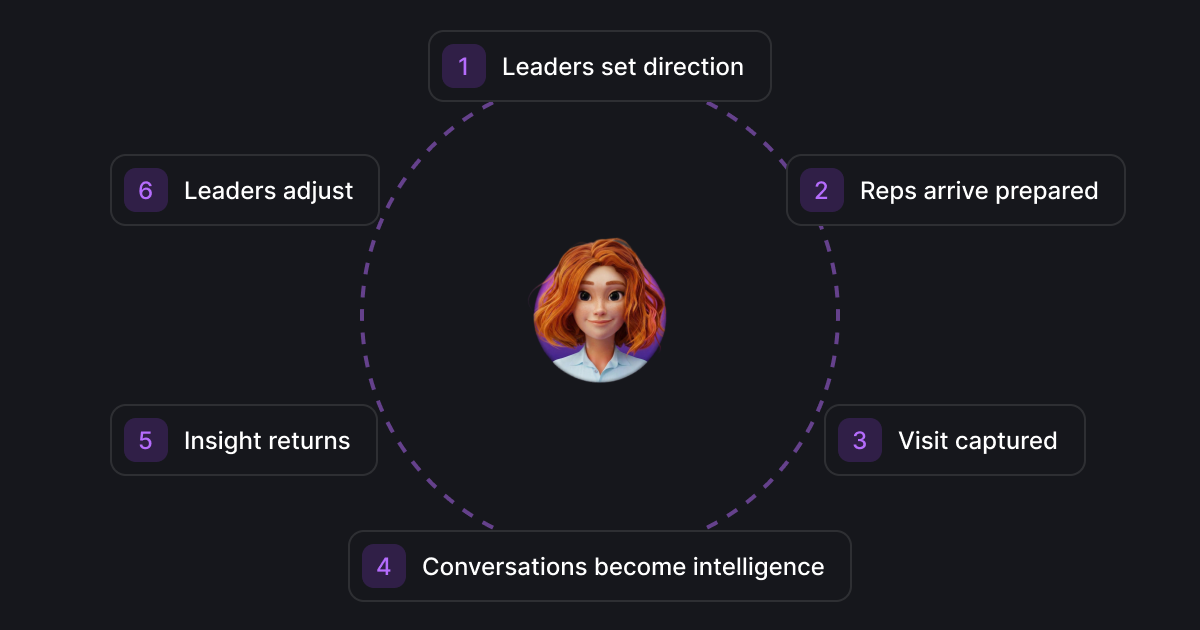
When that exchange works, it compounds. Here is how the loop runs:
- Leaders set direction. Commercial excellence and sales management define priorities, the sales playbook and what to listen for this quarter.
- Field sales reps arrive prepared. Before each visit, the rep has the account history, open opportunities, what colleagues heard and the talking points that matter now.
- The visit is captured. Straight after the meeting, the rep talks it through, and the details land in the right CRM fields, including custom fields, while they're still fresh. Nothing waits for manual data entry at the end of the week.
- Conversations become intelligence. Customer needs, objections, competitor mentions, deal risk and next steps become structured data, across every rep and every visit.
- Insight returns to where it changes behavior. The rep gets the next step and a drafted follow-up. The manager gets coaching moments based on real conversations and real-time visibility into pipeline health. The business gets a current read on pricing, competitors and customer needs.
- Leaders adjust. Coaching, priorities and the playbook change based on what the field is reporting, and the next round of visits starts better informed.
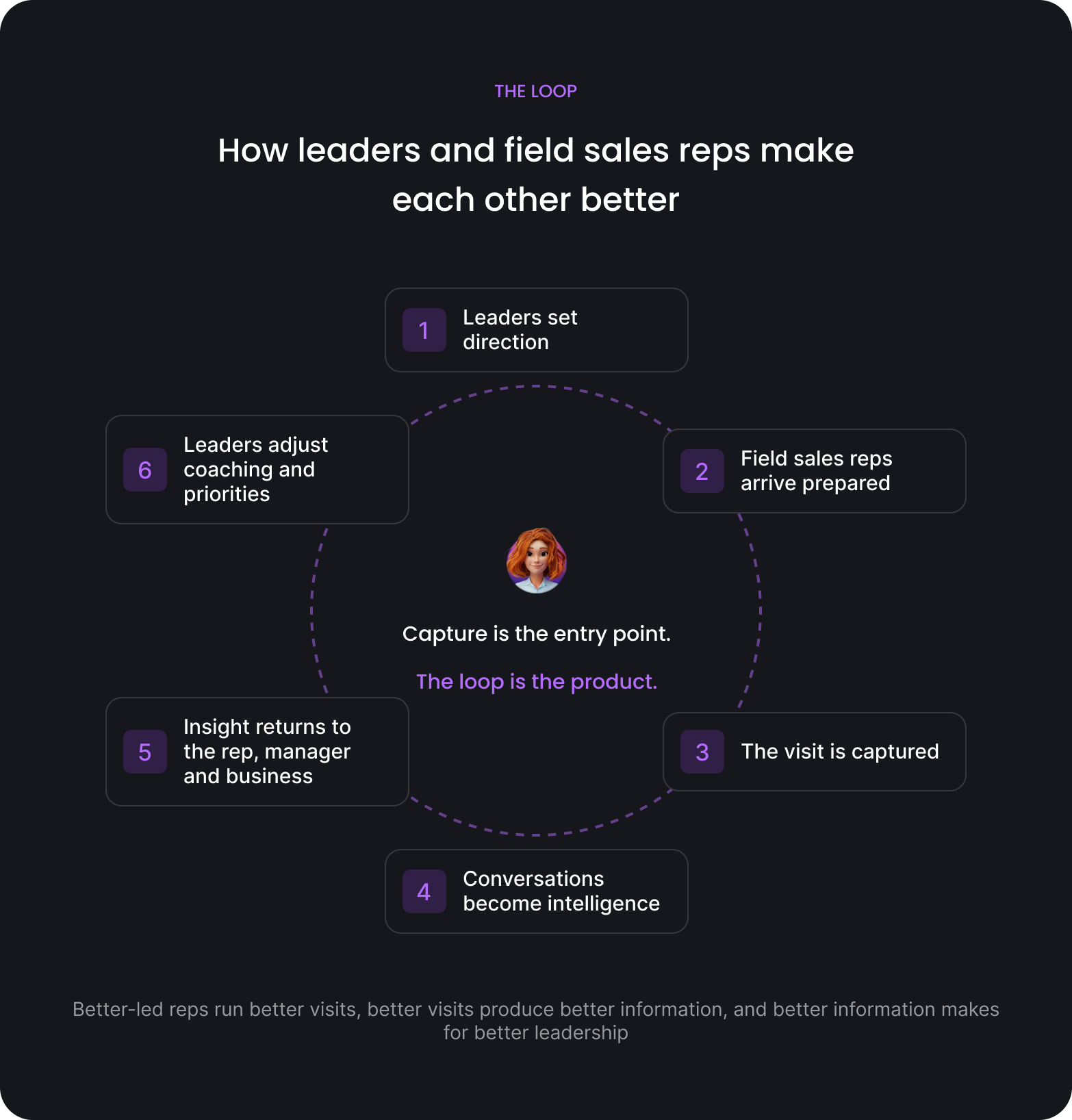
That's the circular effect. Better-led field sales reps run better visits, better visits produce better information, and better information makes for better leadership. Revenue follows the loop, and so does the case for the next round of investment in the team. Capture is the entry point. The loop is the product.
Coaching is the strongest lever leaders have. Research from CEB's Sales Executive Council, published in Harvard Business Review, found that no other productivity investment comes close to coaching, with the best coaching lifting the performance of core performers by up to 19%. The constraint in field sales is evidence: managers can only coach objection handling and value articulation on conversations they see, and they see very few first-hand. That's the gap coaching based on captured visits is meant to close.
Reinvested time grows the business. In Gartner's 2026 survey of 210 CSOs and senior sales leaders, organizations with moderate to large AI time savings that reinvested them were 2.2 times more likely to exceed customer growth goals.
The middle of the team moves most. At a global industrial engineering group using Donna, 10 field sales reps who were below a 25% win rate before the pilot went from 16.3% to 25.0%, measured per rep per month through August 2026.
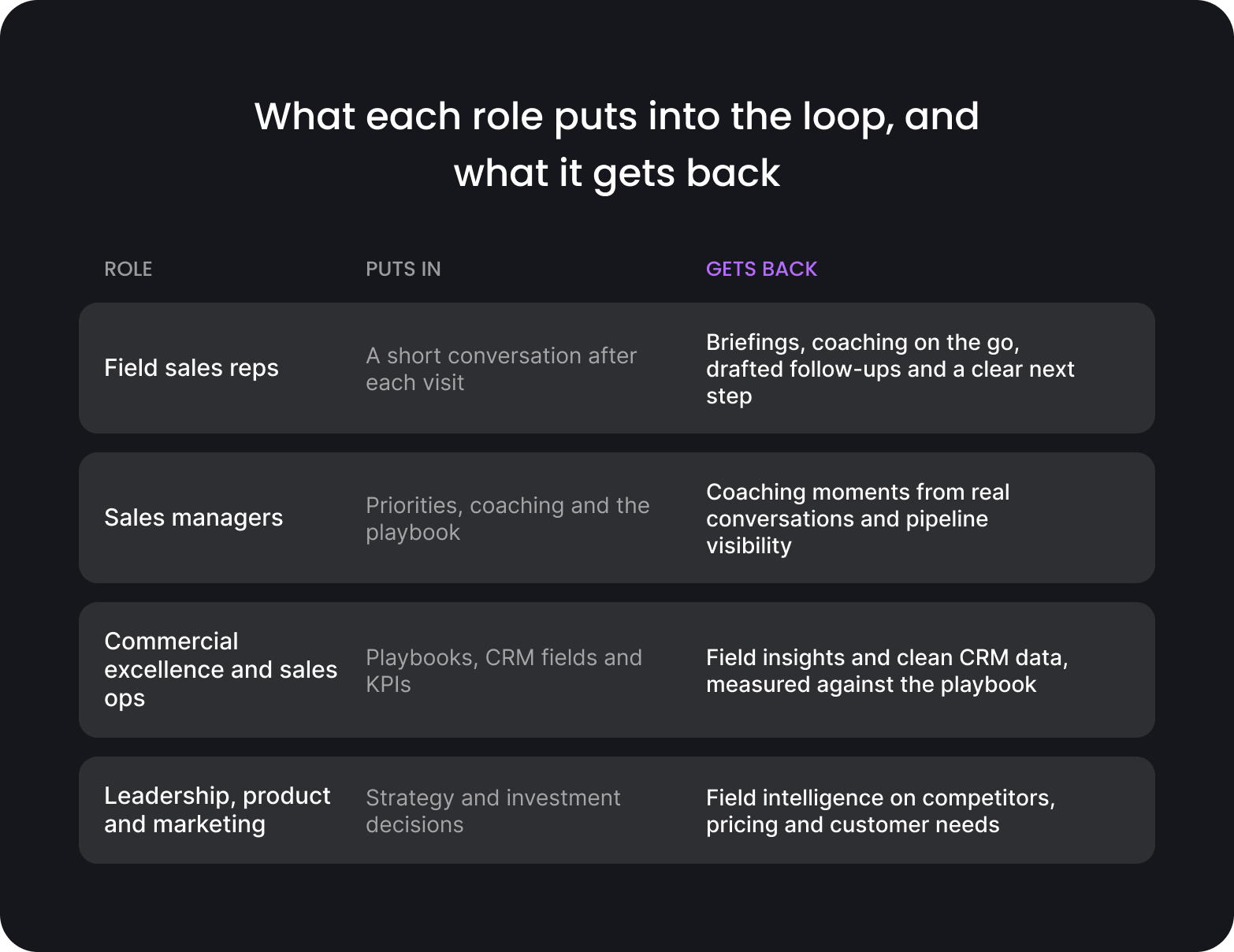
Here is what each role puts into the loop, and what it gets back:
The loop matters most where revenue depends on existing customers and stronger customer relationships: manufacturing, consumer goods, medical devices and healthcare and life sciences.
A field sales rep may cover hundreds of accounts across a large territory, sell technical products to a buying group, and see each customer every few weeks. What was said on the last visit, and what a colleague heard at the customer's other site, decides how the next visit goes. The same holds for the insurance and real estate teams Donna works with.
How AI for field sales changes the rep's day
The clearest way to see the change is one day, moment by moment. The example below follows a field sales rep working with Donna, the only proactive AI assistant for field sales. It shows where AI helps at each step, and the last column shows what a field sales leader can measure.
Writing up call reports is one of the least favorite parts of a field sales rep's week. Automating that admin work is what most AI sales tools aim for. The bigger change is what happens next: the report is complete, it's in the CRM the same day, and it feeds the manager's next coaching conversation and the next briefing for whoever visits that account.

Capturing visits on the road
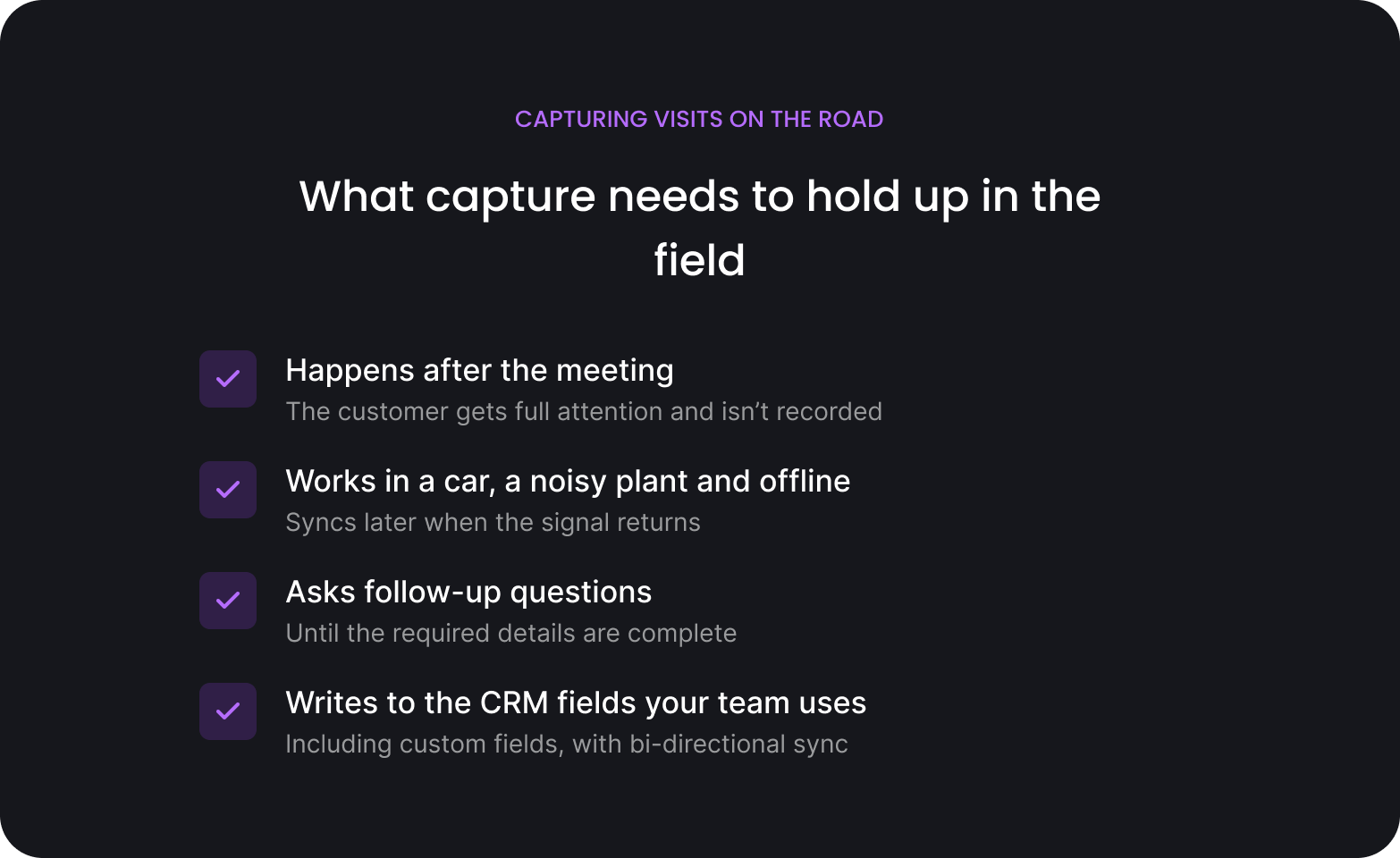
Capture is where field sales AI differs most from earlier approaches. For it to hold up in the field, it needs to:
- Happen after the meeting, so the customer has the rep's full attention and isn't recorded
- Work in a car, in a noisy plant and without a signal, with offline access that syncs later
- Ask follow-up questions until the required details are complete, rather than keep whatever the rep remembered to mention
- Write to the CRM fields and objects the team uses, including custom fields, with bi-directional sync so CRM records stay current
On a noisy plant or mill floor, a recording rarely works. The practical answer is a conversation in the car straight after the visit, and with conversational capture, field sales reps can get the admin done without opening the CRM mobile app at all.
Recording has its place, especially for online meetings. In person, consent rules apply. The state of California, for example, requires the consent of all parties to record a confidential conversation, and under the GDPR you need a lawful basis to process a recording. A debrief after the meeting avoids recording the customer at all.
What to automate first
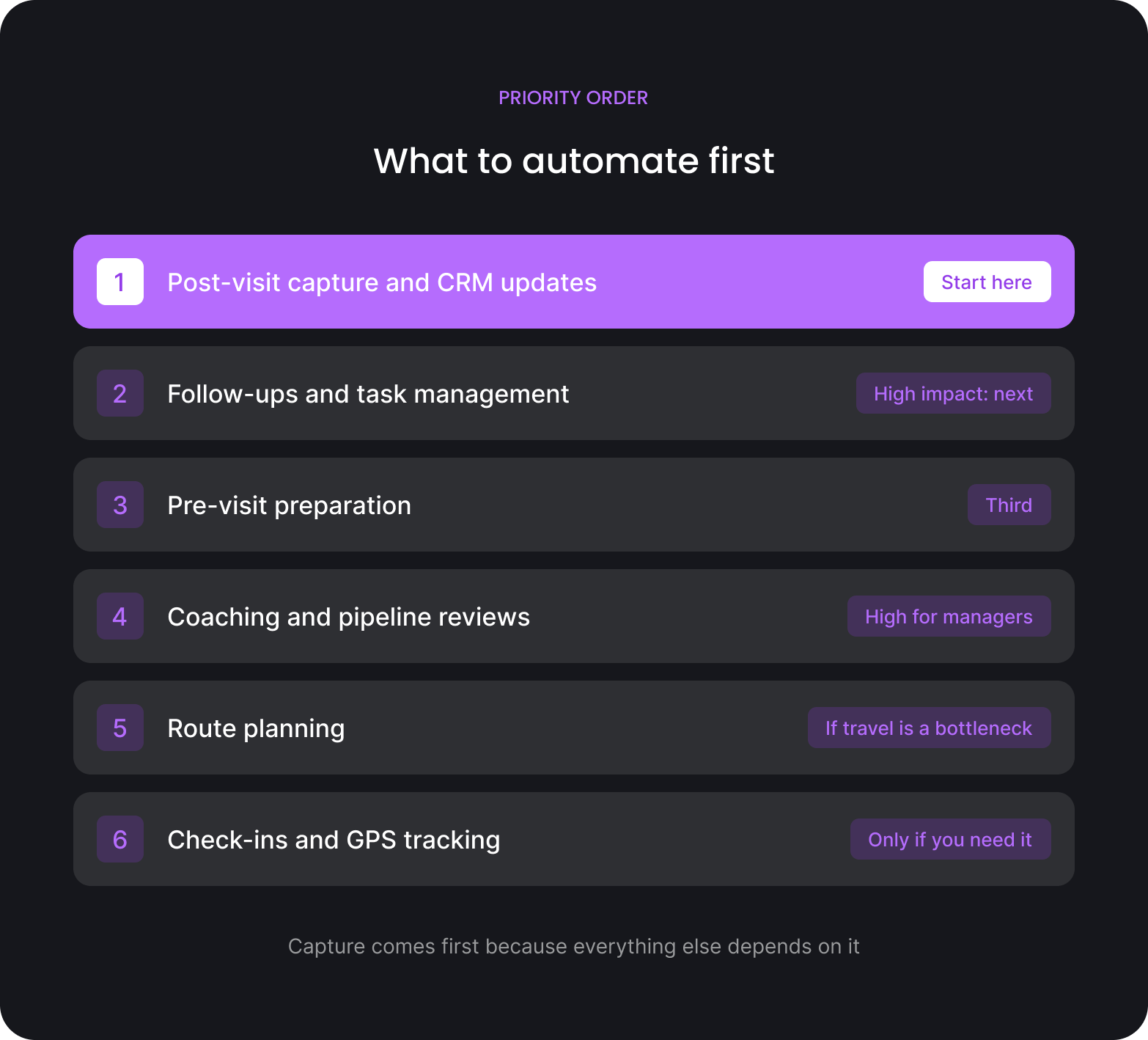
Not every task is worth automating at once. Score each one on its impact on revenue and what the data it produces feeds.
Capture comes first because everything else depends on it. A briefing is only as good as the last visit report, and a manager can only coach on what reached the CRM. If capture is thin, AI features on top of it will be thin too. Once capture works, it's easy to automate follow-ups and briefings as well. Our guide on getting field sales reps to use the CRM goes deeper on why.
Run a one-week time audit before you buy. Ask five field sales reps to log, in 15-minute blocks, time spent driving, preparing, in meetings, writing up and following up, then compare it with the CRM logs for the same week. Then ask their managers one question: how much of last month's coaching was based on a customer conversation you heard first-hand? The answers give you a baseline for both sides of the loop.
Results to expect, and how to reinvest the time
Bain estimates that AI successes across the sales funnel could add up to more than a 30% increase in win rates. That's a projection, not a guarantee. The time saving is more immediate: Gartner's 2026 survey found AI saves sellers an average of 4.8 hours a week, but 72% of sales organizations report low reinvestment of that time in high-value work.
That second number is where leadership comes in. Hours saved aren't a result on their own: they buy back hours, not performance. Decide as a leadership team, before rollout, where the time should go:
- One or two extra customer visits a week
- Faster follow-up on open opportunities
- Account planning for the top accounts
- Coaching conversations built on captured visits
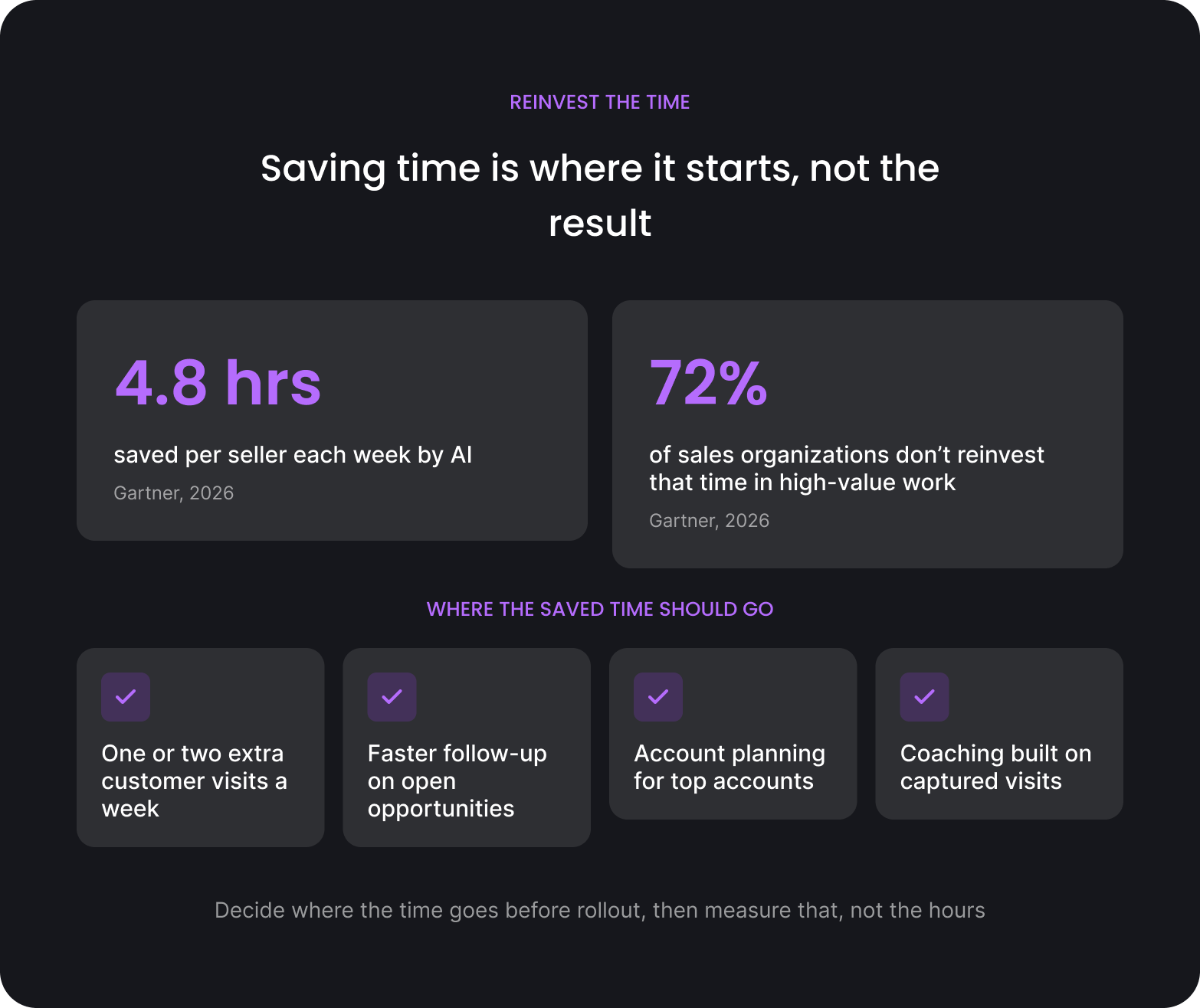
Then measure that, not the hours. Our guide on measuring field sales productivity covers the metrics in more detail.
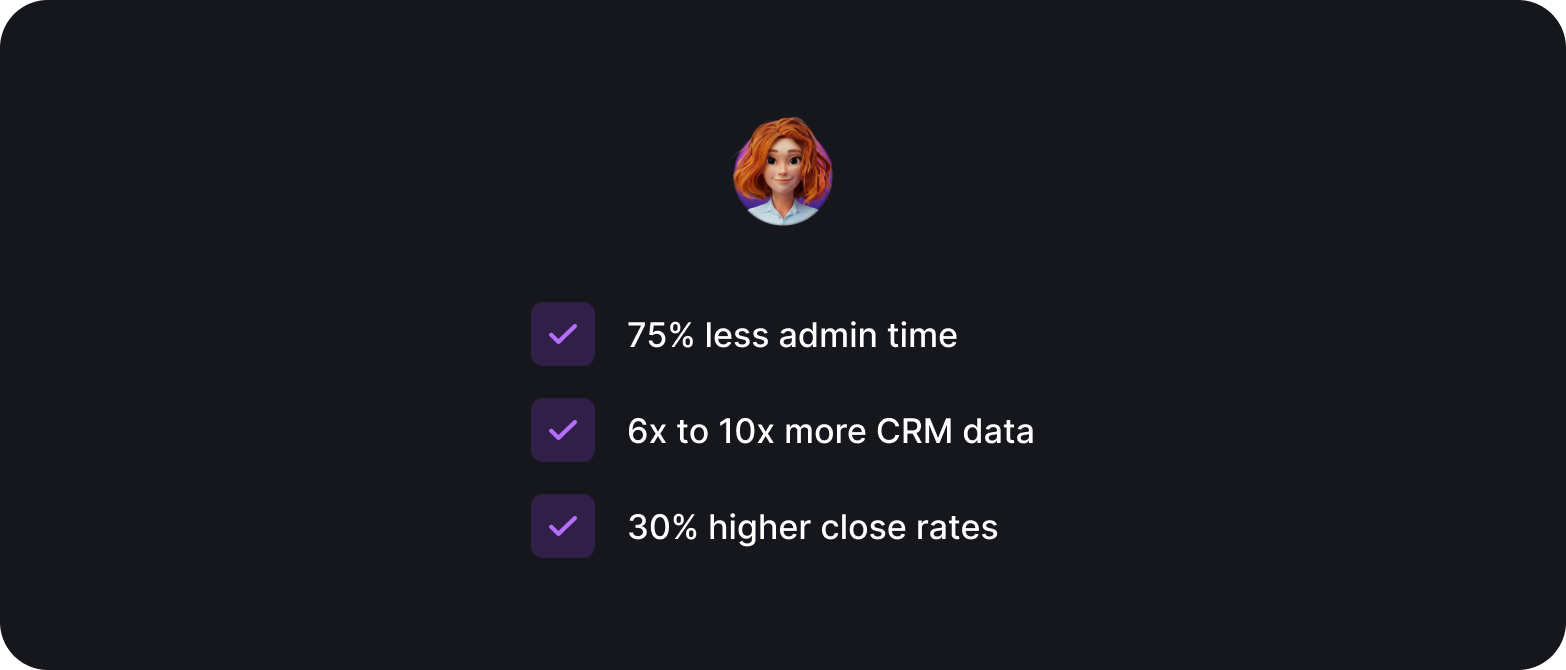
Teams using Donna see 75% less admin time, 6x to 10x more CRM data and around 30% higher close rates, and most are onboarded in four to six weeks. Individual customers have measured the results below, and there are more in our customer stories:
"The win rate is the most important thing in sales. One of our team members was already winning 30% more than last year, and that was only three months into the year. I think this is gold." Business process expert, sales and marketing, global industrial engineering group
How to implement field sales automation: a 90-day plan
Most field sales automation projects stall in the pilot, not the set-up. A 90-day plan keeps the focus on proving results for field sales reps and their managers:
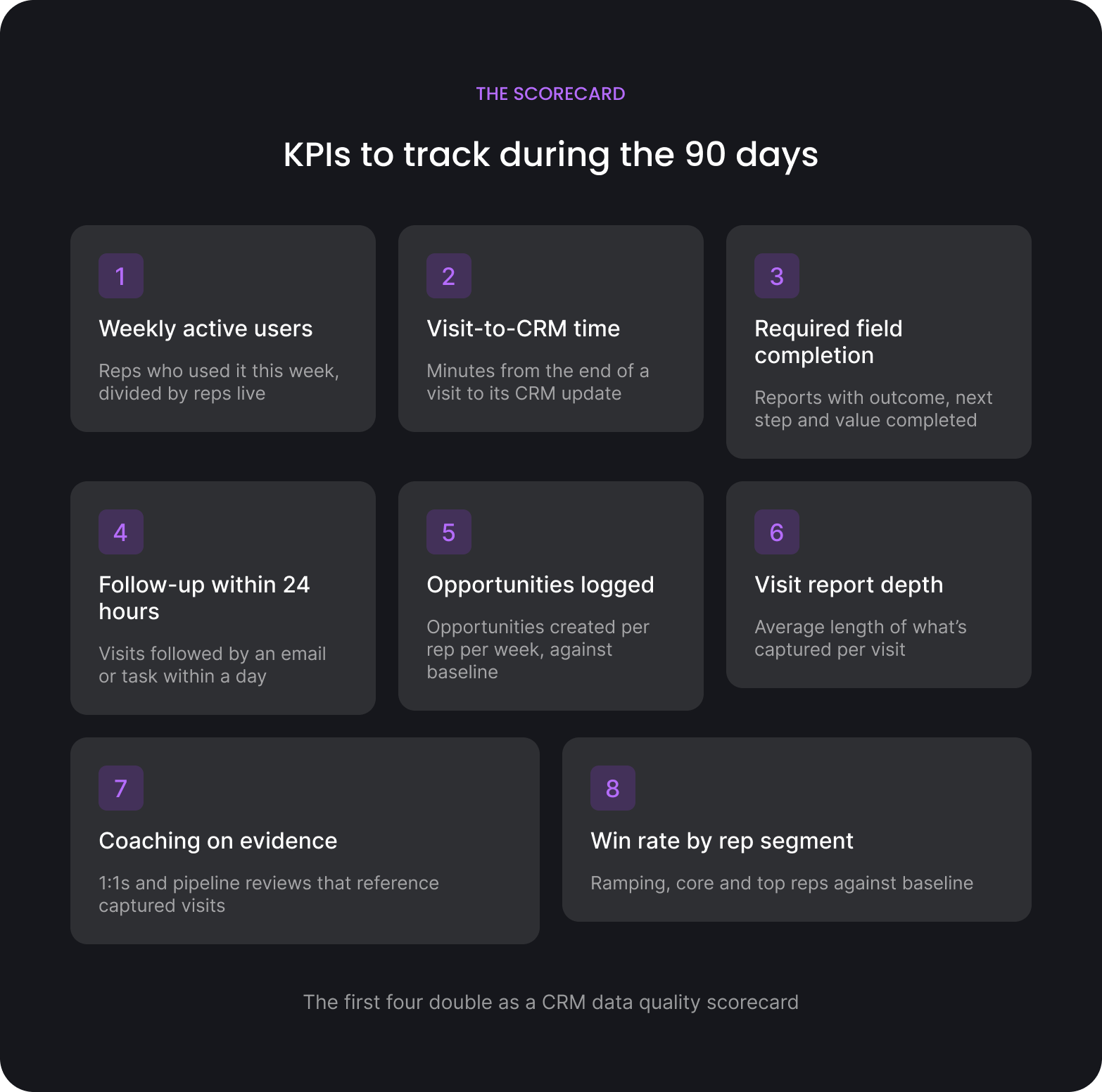
With an assistant built for field sales, set-up takes weeks, not months: most teams are onboarded on Donna in four to six weeks. The rest of the 90 days is for proving the loop. Track a short list of KPIs with clear definitions:
For CRM owners, the first four double as a CRM data quality scorecard: freshness and completeness are what make field data usable.
How to choose field sales automation software
Use this scorecard when you compare vendors. The questions matter more than the feature list.
Common field sales automation mistakes to avoid
Most field sales automation mistakes come from treating it as an admin project rather than a sales one:
- Automating tracking before capture. Knowing where field sales reps were tells you little. Knowing what customers said tells you a lot.
- Buying for the rep and forgetting the manager. If insight doesn't reach the 1:1 and the pipeline review, the loop stops with the rep.
- Adding AI tools instead of removing steps. Every new screen competes for attention. Prefer solutions that work through channels field sales reps already use, like a phone call.
- Measuring hours, not outcomes. Agree in advance what saved time should buy.
- Skipping the baseline. Without a before, you can't prove an after.
Where Donna fits
Donna is the only proactive AI assistant for field sales. She prepares field sales reps before every meeting, captures each visit in a short voice-to-voice conversation (or by chat or voice note, if the rep prefers), handles CRM updates and follow-ups, and returns what she learns to managers as coaching moments and to the business as field intelligence.
Field sales reps communicate how and when they like – text, voice, or call – online or offline, and Donna integrates with Salesforce, SAP Sales and Service Cloud V1 and V2, Microsoft Dynamics, HubSpot or another CRM, plus your calendar, email and business systems such as the ERP. Donna is configurable to your teams' way of working and grows with your needs, backed by a network of integration partners and support across the globe.
See how she works on our field sales software overview, or call Donna.
FAQs
What is field sales automation?
Field sales automation is software that takes manual data entry and other repetitive work off field sales reps, from visit planning and meeting preparation to capture, CRM updates and follow-ups. In 2026 it increasingly uses AI to return what was learned to managers and leadership as coaching and real-time insights.
What's the difference between field sales automation, sales force automation and a CRM?
The CRM is the system of record. Sales force automation standardizes the process inside it: pipeline stages, lead scoring, task management and approvals. Field sales automation gets information into and out of the CRM for people who sell away from a desk, with briefings before visits, capture after them and CRM sync without typing.
What can you automate for outside sales teams?
Most outside sales teams start with what happens after a visit: visit reports, CRM records and tasks, plus AI that can draft follow-up emails. Next comes meeting preparation, pipeline updates and coaching. Route planning and check-ins help with travel and proof of visit, but they rarely change results on their own.
How do you manage and coach a field sales team you rarely see in person?
Give managers evidence instead of anecdotes. When every visit is captured, managers get real-time visibility into what customers said, where deals are stuck and how the playbook is being applied, without chasing reports. 1:1s and pipeline reviews become specific, and the middle of the team improves fastest. Proactive pipeline management shows what that looks like in practice.
Our CRM already has AI features. Why would we need a separate AI assistant?
CRM AI features are built to work inside the CRM, and they're useful there. The question is where your field sales reps are when the work happens: in the car, between visits, often without opening an app. An assistant built for field sales works around that moment. It prepares reps before meetings, captures visits in a conversation and writes the results back to the CRM, so the two work together.
Can't field sales reps just use a general AI assistant on their phone?
They can talk to one, but a general assistant doesn't know your accounts, your calendar, your playbook or your CRM fields, and it won't reach out before the next meeting. Field sales AI is useful because it works with your company's context and writes structured data back to the CRM, where managers and sales operations can use it.
We already have this data in our CRM. What would we learn that we don't know now?
A CRM only holds what fits in a field, and only if someone entered it. Most of what customers say in a visit, such as objections, competitor quotes, pricing feedback and reasons a project slipped, never gets there. Capturing visits in a conversation turns that information into sales data you can report on. That's the idea behind field intelligence.
Do customer meetings have to be recorded?
No. Recording is one option, mostly for online meetings, and many customers aren't comfortable with it in person. Consent rules also vary: California requires the consent of all parties to record a confidential conversation, and the GDPR requires a lawful basis for processing recordings. A debrief after the meeting avoids recording the customer altogether. Check with your legal team.
Will field sales reps have to open the CRM app, and does it work offline?
They shouldn't have to. With conversational capture, field sales reps get the admin done by talking a visit through, and the assistant handles the CRM sync. Good solutions also offer offline access and sync when the connection returns. For every field sales team, whatever CRM it runs, getting the admin done without logging in is often what moves CRM adoption.
How do you prove ROI to leadership?
Set a baseline before go-live, then compare a pilot group with a similar group that isn't using the solution yet. Track weekly usage, required field completion, follow-up within 24 hours and win rate by rep segment. Hours saved only count when they turn into more time selling, more visits or better results. Onboarding takes four to six weeks, so plan around 90 days to measure.
Will AI replace field sales reps?
No. In complex B2B sales, the relationship and the judgment in the room stay human. AI takes on the work around the visit, so field sales reps spend more time with customers, build stronger customer relationships and arrive better prepared.
Related articles

Most advice on how to use AI in sales assumes a seller at a desk. Field sales reps need a proactive AI that reaches them by voice, between visits, without opening another app. The highest-value use cases sit around the visit: a briefing before, a conversational debrief after, and the CRM updates and follow-ups that come from it. Capture is the entry point. What field sales reps capture returns to managers as coaching and to leaders as market insight, and that loop moves win rates more than the hours saved. AI drafts and suggests; the field sales rep decides and sends. Keeping a human in the loop is the balance that keeps trust. Start with one daily routine, not one tool per use case, and decide in advance where the saved time goes.
Sales

Microsoft Dynamics 365 gives field sales teams a secure, mobile friendly CRM that centralizes account history, opportunities, and activities so reps can prepare fast, log visits, and keep managers aligned. The challenge is manual data entry during hectic days on the road, which leads to late or incomplete updates and weakens forecasting, coaching, and follow up quality. Use the Dynamics 365 mobile app, Outlook, and Teams to prepare for meetings, capture visit notes, and manage next steps in real time. Keep workflows simple with standardized stages, next step fields, and weekly pipeline reviews to maintain clean, consistent data. Layer proactive AI like Donna on top of Dynamics 365 to auto capture notes, update opportunities, and draft follow ups so reps cut admin and leaders gain reliable visibility.
Sales

Modern field sales reps must manage complex buying groups across industries, which stretches cycles and creates heavy CRM admin. This article explains how to identify decision makers early, keep messages consistent across meetings, and maintain organized stakeholder maps without overwhelming reps on the road. Map economic, technical, legal, compliance, and end user roles early, then keep that map current in your CRM. Capture decisions, objections, and next steps immediately after each visit to avoid misalignment and lost trust. Use a simple, repeatable system for prep, note capture, and follow-up to improve CRM adoption and forecast accuracy. Automated, voice-driven assistants like Donna reduce manual admin, enrich data quality, and help field teams scale consistent stakeholder management.
Sales
Talk to Donna today
Discover how Donna can simplify life for field sales teams


FAQs
Got questions? Donna got answers. Here’s what field sales teams ask most.
Is it legal to record online and offline customer conversations with Donna?
Yes, in most cases, as long as the applicable notice and consent requirements are followed. Recording laws vary by jurisdiction, so the key principle is to be transparent with participants and obtain consent where required. Donna includes controls to support this.
How does Donna use AI?
Donna combines different AI models to deliver a seamless experience, allowing users to text Donna, call Donna, or send voice notes. Donna uses AI to transcribe meeting recordings, help prepare meetings, generate summaries, capture and surface insights and propose or automatically perform actions such as updating the CRM, scheduling a follow-up meeting, or preparing a follow-up email.
Is customer data used for AI model training?
No. Customer data is never used to train or improve our or third-party AI models.
What is Donna and how does she help field sales teams?
Donna is a proactive AI assistant for field teams delivering hyper-personalized briefings, capturing every detail, and killing the admin time. She helps sales reps save time by preparing meetings, taking notes, updating the CRM, and drafting follow-ups automatically. With Donna, sales teams spend less time on admin and more time selling. Faster execution, stronger CRM adoption, and more wins, without longer hours. Happier, sharper teams start today with Donna.
Does Donna take notes during meetings automatically?
Yes. Donna listens, online and in person, to your meetings or calls, captures key points, and structures them into clean notes. Everything is stored and ready for review, so you can stay focused on the customer instead of typing. If you are not comfortable having a notetaker in your meeting, you can always update Donna afterwards.
Can Donna really update my CRM for me?
Absolutely. Donna automatically updates or creates contacts, opportunities, prepares quotes in your CRM and drafts follow-up mails. All data stays accurate and up to date without manual entry.
What tools and CRMs does Donna integrate with?
Donna integrates with Salesforce, SAP, Microsoft Dynamics 365, Outlook, Google Calendar, and more. Even if your CRM includes custom objects and fields, Donna connects seamlessly to keep everything in sync. Find all integrations here.
How much time can sales reps save by using Donna?
Sales teams typically spend less time on admin by 75%. By automating meeting prep, note-taking, and CRM updates, Donna helps reps reclaim time to focus on customers and close more deals.
Is Donna secure and GDPR-compliant?
Yes. Donna is ISO 27001 certified and fully compliant with GDPR, CCPA, and SOC 2. All data is encrypted in transit and never used to train AI models.
Our CRM is customized. Can Donna handle this?
Yes. Donna works with both standard and custom CRM objects and fields. Whether your setup is simple or highly customized, Donna connects seamlessly and keeps all your data accurate and up to date.
How is Donna different from other AI sales tools?
Donna’s purpose is built for field sales. Unlike generic AI assistants, Donna connects with your CRM, captures meeting notes, and updates contacts and opportunities automatically, even on the go. As Donna is deeply integrated into the day-to-day of field sales teams, she delivers a proactive, voice to voice and hyper-personalized experience.
How long does it take to set up Donna?
Users can start having conversations with Donna from day 1 and having your full team live on your workflows from week 3.