Sales
How to Use AI in Sales: 12 Use Cases for Field Sales Teams in 2026

Most advice on how to use AI in sales is written for sellers at a desk, and most AI sales tools are built for cold outreach, inbox work and video calls. Field sales professionals work differently: they spend their day in the car, on customer sites and across the table from buyers, and the work around each visit is where AI helps most, from preparing the meeting and getting coached on the go to capturing what was said and handling the repetitive sales tasks afterwards.
This guide is written for the sales leaders and sales managers who decide how that happens. AI saves a field sales rep time on manual data entry and other repetitive tasks, but the bigger gain for sales performance comes when what reps capture flows back to managers as coaching and to the business as field intelligence, and leaders use it to shape the next sales strategy. The 12 use cases below follow a rep's day, each with a how-to, an example prompt, a metric and a watch-out. The examples come from teams using Donna, the only proactive AI assistant for field sales.
What is generative AI for sales?
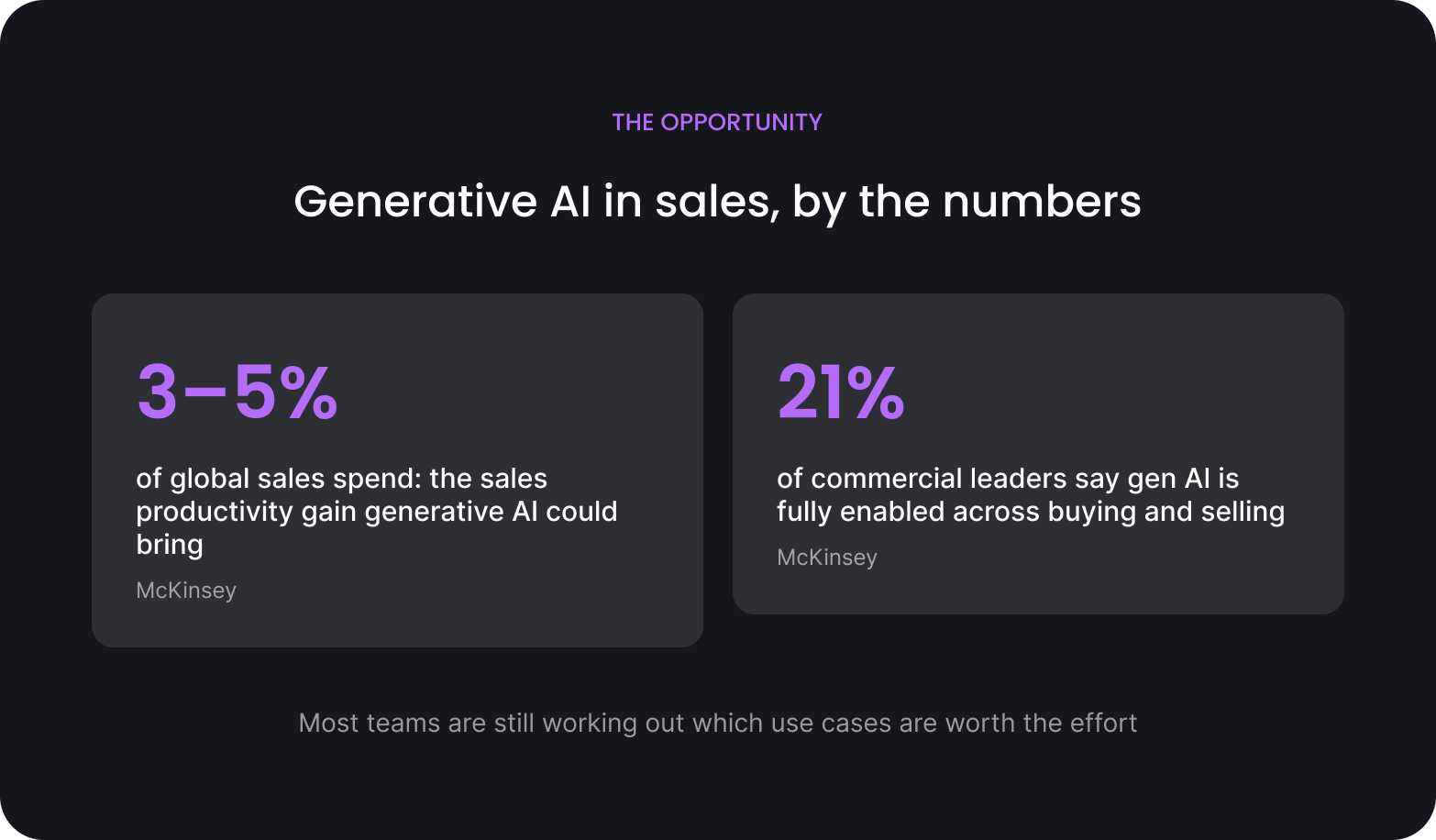
Generative AI for sales uses large language models, a form of AI technology trained with machine learning, to create what sellers would otherwise write or look up: account briefings, meeting summaries, CRM notes, follow-up emails and answers to questions about customers and deals. McKinsey estimates generative AI could raise sales productivity by roughly 3 to 5% of global sales spend.
Adoption is still uneven. In another McKinsey report on B2B sales, just 21% of commercial leaders said their companies had fully enabled enterprise-wide gen AI adoption in buying and selling. Most teams are still working out which use cases are worth the effort beyond basic sales automation.
What is conversational AI for sales?
Conversational AI for sales uses natural language processing so sales professionals can work with AI by voice or chat instead of forms and menus. For field sales, the most useful form is voice-to-voice: the field sales rep talks, the AI answers or asks follow-up questions, and the result is structured data in the CRM and clear next steps. That's how a proactive AI assistant for field sales works: it reaches the rep before and after each meeting instead of waiting to be opened.
Why using AI for sales looks different in the field
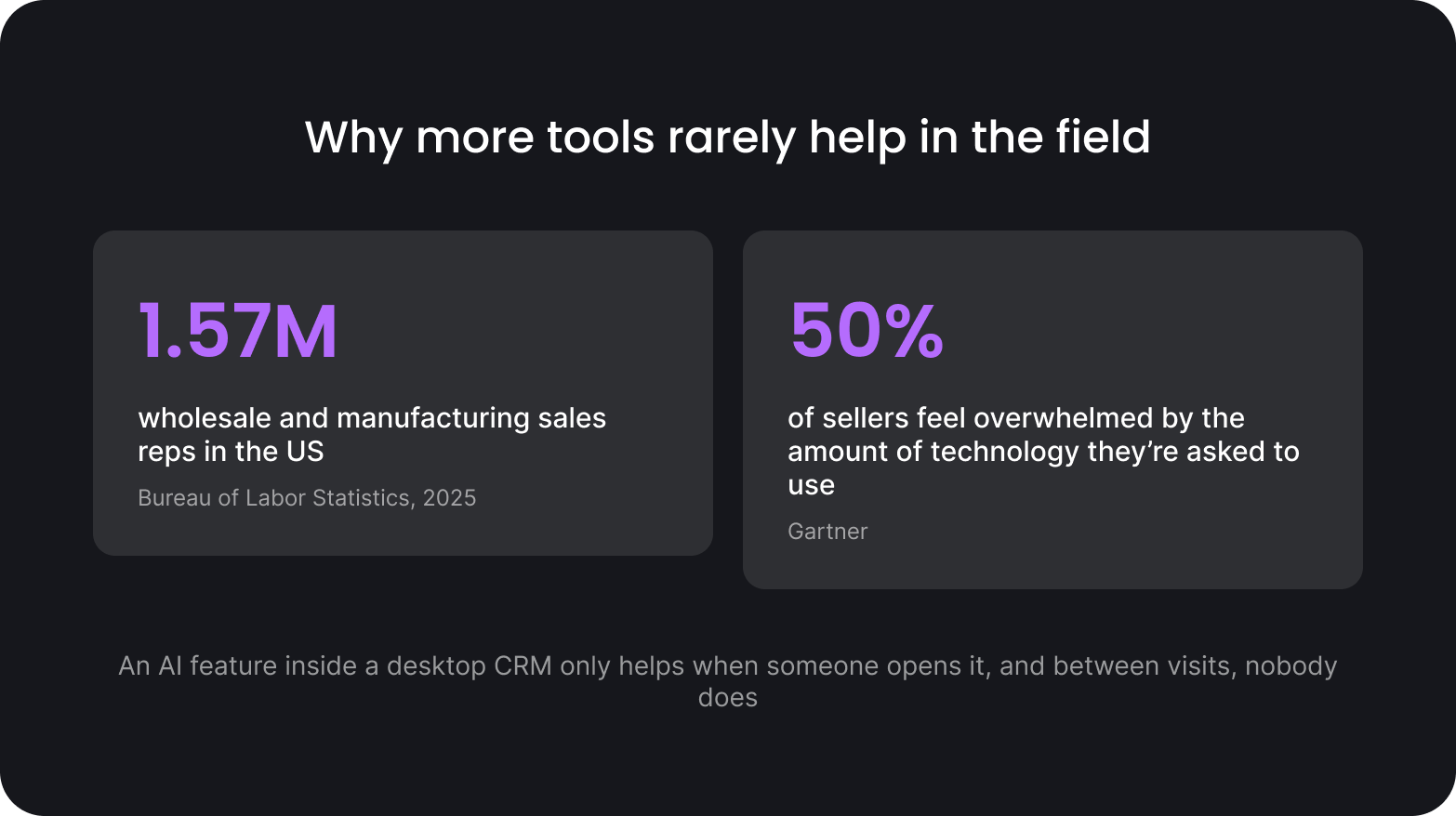
Field sales reps spend their day in the car, on customer sites and across the table from buyers. In the US alone, the Bureau of Labor Statistics counts 1,571,400 wholesale and manufacturing sales representatives (2025), and notes that outside sales representatives "spend much of their time traveling to and visiting with current clients and prospective buyers." An AI feature inside a desktop CRM only helps when someone opens it, and between visits, nobody does.
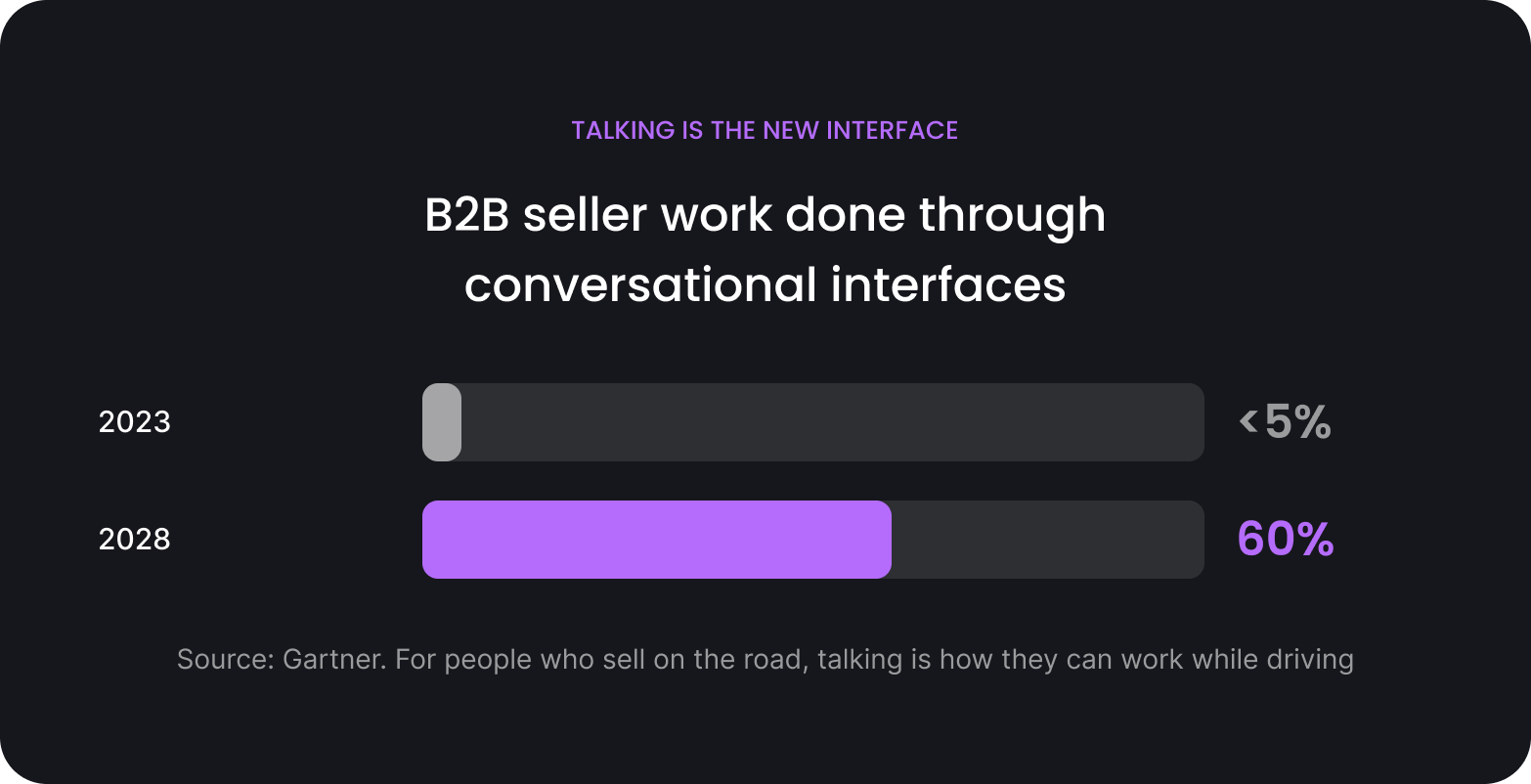
That's why the interface matters as much as the model. Gartner expects that by 2028, 60% of B2B seller work will be done through conversational interfaces powered by generative AI, up from under 5% in 2023. For people who sell on the road, that shift matters more than for anyone: talking is how they can work while driving.
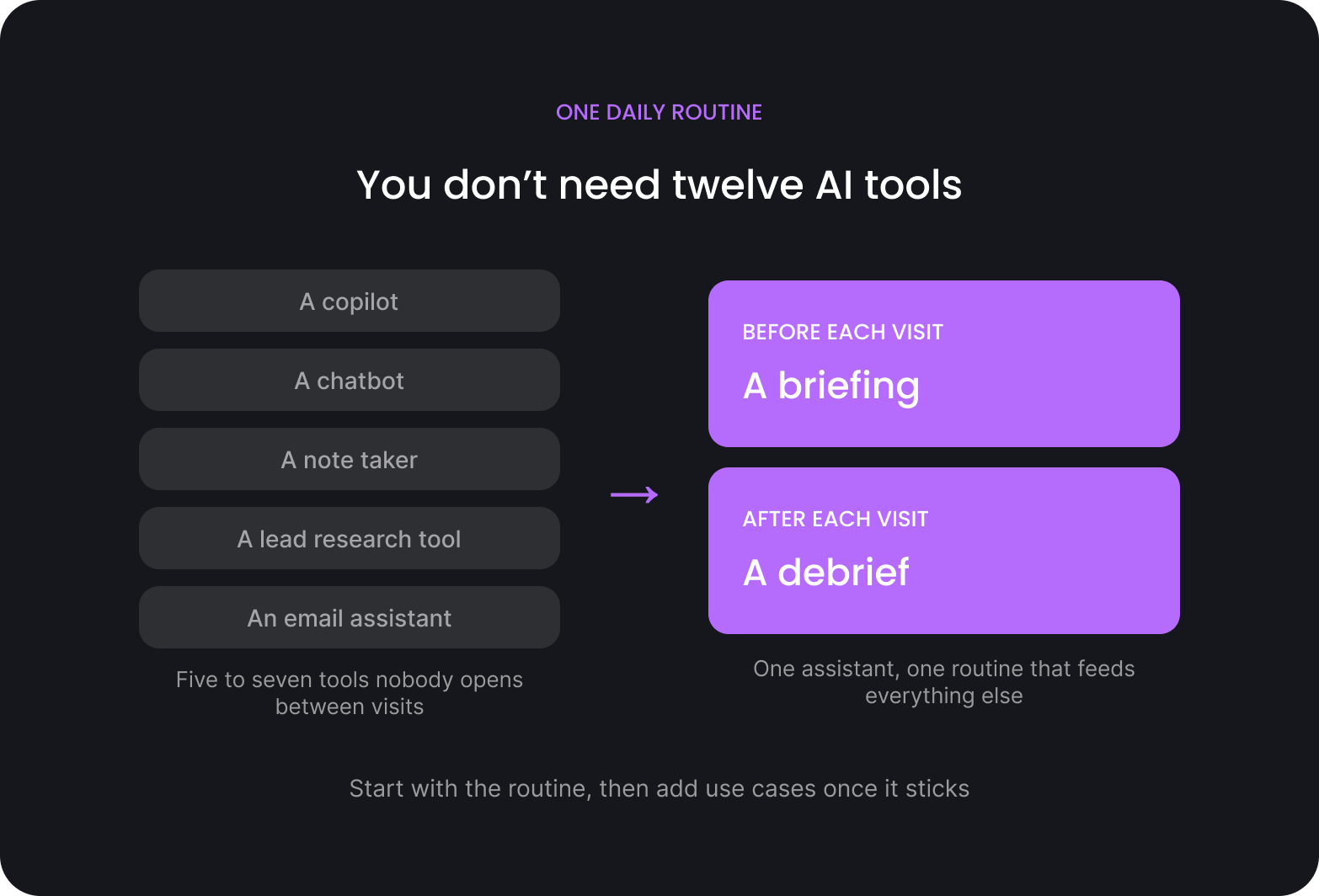
It also explains why more tools rarely help. Gartner found 50% of sellers feel overwhelmed by the amount of technology they're asked to use, and every new set of sales tools adds to it. A copilot for one job and a chatbot for another soon leaves field sales reps juggling five, six or seven systems, none of which they open between visits.
Some popular use cases also translate poorly. Predictive analytics, from lead scoring to sales forecasting, uses machine learning on historical data, so it needs clean, consistent CRM fields and plenty of comparable deals. In many manufacturing businesses, sales cycle length ranges from a few hours to a couple of years, often with product development in between, and revenue is frequently unknown when the opportunity opens. For teams like that, AI is far more useful for capturing and acting on what customers say than for scoring deals, and accurate sales forecasts start with complete visit reports.
There's a bigger reason the field is different. These are businesses with complex sales cycles, where human connection and expert advice decide the deal. In manufacturing, consumer goods, medical devices and healthcare, the gap between the best field sales rep and the median one is rarely a knowledge gap. It is an execution gap. AI closes it only when what reps hear in the field reaches the managers who coach them and the leaders who set priorities. That's why the last three use cases below are for the team, not the individual rep, and why they're where field sales teams build a competitive edge.
12 use cases of AI in sales for field sales teams
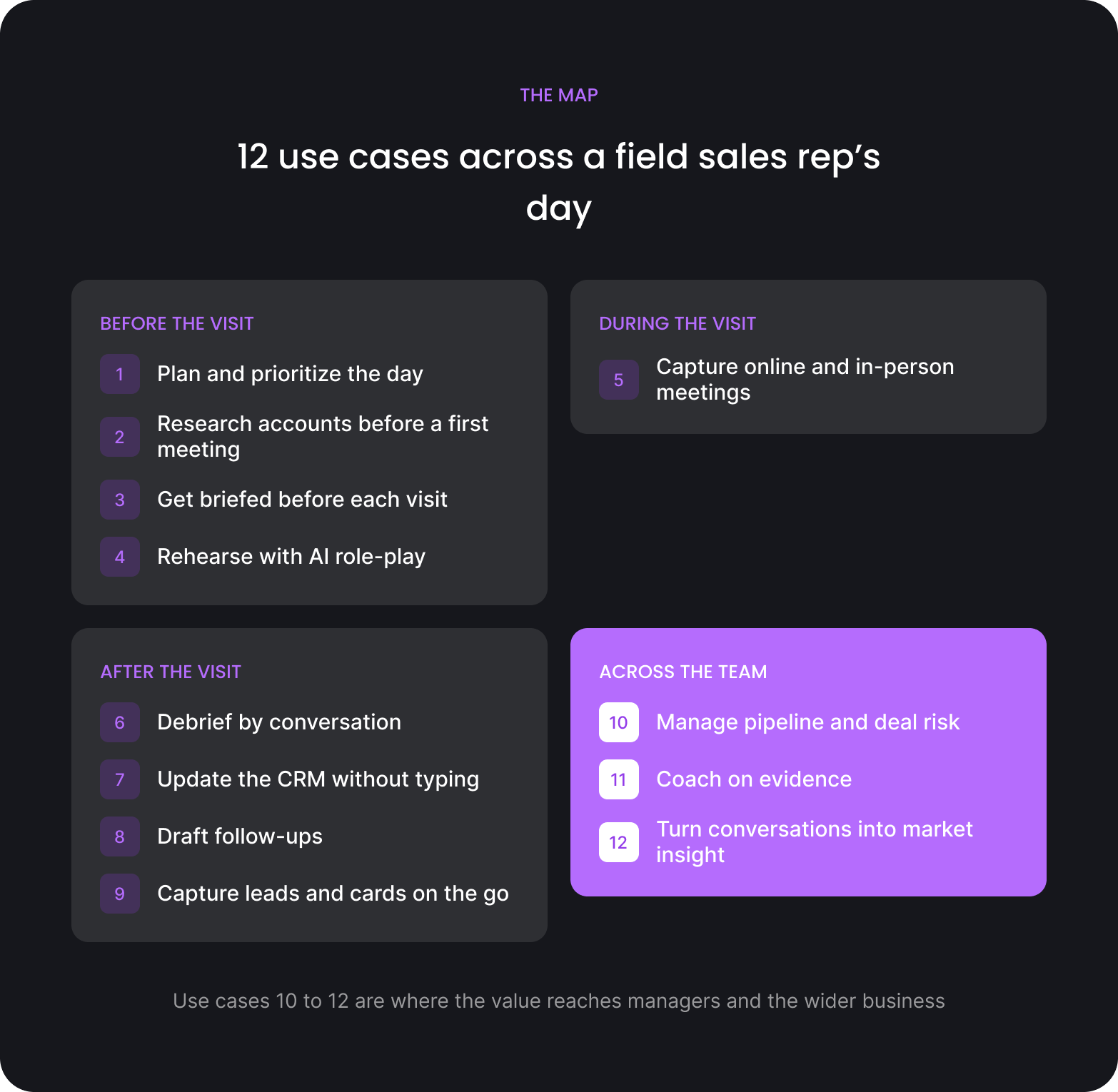
The table maps each use case to the moment in a field sales rep's day when it happens, what AI does and what the rep still decides. Use cases 10 to 12 are where the value reaches managers and the wider business.
How to use AI in sales: 12 use cases for field sales teams
These AI sales examples are written as things a field sales rep or manager might say to an AI assistant. Adapt them to the AI-powered tools you use. If you use a general-purpose chatbot, check your company's policy before pasting in customer data.
Before the visit
Preparation is where AI saves field sales reps the most searching, and where a good briefing changes the meeting itself.
1. Plan and prioritize the day
Five or six visits a day, plus calls and other sales activities, leave little time to check what's changed across the CRM, the calendar, email, the ERP for orders and financial numbers, BI tools for targets and the sales enablement platform for the right sales materials. AI can pull it together into a short run-through, including an estimate of what each open opportunity is worth, so the rep knows which accounts matter most today.
How to do it: connect the AI to the calendar, CRM, ERP and other business systems; ask for a summary at the start of the day; ask follow-up questions about anything that's moved.
Try it: "What's on today, what changed since yesterday, and which account needs the most attention?"
Measure: share of visits with a clear objective set in advance.
Watch out: meetings that live only in one system (calendar or CRM) get missed unless both are connected.
2. Research accounts before a first meeting
New accounts from events, referrals or inbound requests often arrive with little more than a name. Before the first visit, AI can pull together what your company already knows about the account (earlier contacts in the CRM, past orders in the ERP), find similar customers you've already won and the sales materials that fit them, and add market context. The rep walks in with a plan and the right questions instead of a cold start.
How to do it: point the AI to the systems that hold account history (CRM, ERP, sales enablement content); ask for similar customers and the case studies that fit; agree the two or three questions the rep wants answered in the meeting.
Try it: "I'm meeting a new contact at the plant tomorrow. What do we already know about this account, which similar customers can I mention, and what should I ask?"
Measure: share of first meetings that end with an agreed next step.
Watch out: public information about a new account is often outdated. Treat it as a starting point and confirm it in the meeting.
3. Get briefed before every visit
This is the use case field sales reps notice first. On the way to a meeting, a proactive AI assistant calls the rep and recaps the last visit, what was promised, which products and prices were discussed, who else is involved and whether a colleague has been there since. Connected to an ERP, it can add open orders or delivery issues. At Döhler, sales reps can now ask Donna about open orders and invoices in SAP ERP on their way to a customer, so they walk in fully prepared. Our page on AI meeting preparation shows what a good briefing covers.
How to do it: decide which sources the briefing should draw on, from CRM fields to ERP orders and invoices, BI targets and sales enablement content; keep it under two minutes; let the rep ask for more on any point.
Try it: "Brief me on my 10 o'clock: last visit, open opportunity, decision makers, and anything I promised."
Measure: share of visits preceded by a briefing; manager rating of meeting quality.
Watch out: a briefing is only as good as the last visit report. If the CRM is thin, fix capture first (use cases 6 and 7). For guidance tied to your sales process, see guided selling for field sales.
4. Rehearse with AI-assisted sales coaching
AI can play the customer before an important meeting, even in the car on the way there: raise the objections you expect, push back on price, ask the awkward question. It turns sales training into practice for the next real conversation. AI-assisted sales coaching on objection handling works best when it's tied to a real deal and your own field sales playbook.
How to do it: give the AI the account context and your playbook; ask it to play a specific role (procurement, a technical buyer); ask for feedback at the end.
Try it: "Play the procurement lead at this account. Push back on our price increase. Then tell me what I could have handled better."
Measure: win rate on deals where the rep rehearsed vs. those where they didn't.
Watch out: generic role-play scenarios feel like training homework. Keep it to the next real meeting. More on AI sales coaching.
During the visit
In the meeting, the rep's attention belongs to the customer. AI's job is to make sure nothing that's said gets lost.
5. Use AI for sales calls and in-person meetings
For online meetings, an AI note taker can join, transcribe and summarize. That's now standard. In-person meetings are harder, and they're where field sales happens.
How to do it: use a note taker for video calls; record in person only where the customer agrees and local law allows; otherwise, debrief straight after (use case 6).
Try it: at the start of a recorded meeting, "Before we start, are you comfortable with me taking AI notes of this conversation?"
Measure: share of meetings with notes in the CRM within the hour.
Watch out: recording rules differ. Several US states, including California, require consent from everyone in the conversation, and in Europe the GDPR applies. Noisy settings, like a plant or mill floor, also break transcription. Compare options in our roundup of AI meeting assistants for sales teams.
After the visit
This is where field sales data is won or lost. Capture is the entry point: every use case that follows depends on it.
6. Debrief with conversational AI for sales
Call reports are where field sales data goes to die. Writing them up is one of the least favorite parts of a field sales rep's week, so they arrive late, short or not at all. A conversational debrief changes that: the field sales rep talks for two or three minutes, and the AI asks for what's missing (deal value, close date, decision makers, next step) until the record is complete. A proactive assistant doesn't wait for the rep to remember: Donna calls the rep about 10 minutes after the meeting, based on their agenda, and leads the debrief. At DPG Media, the average visit report score rose 175% after account managers started debriefing with Donna.
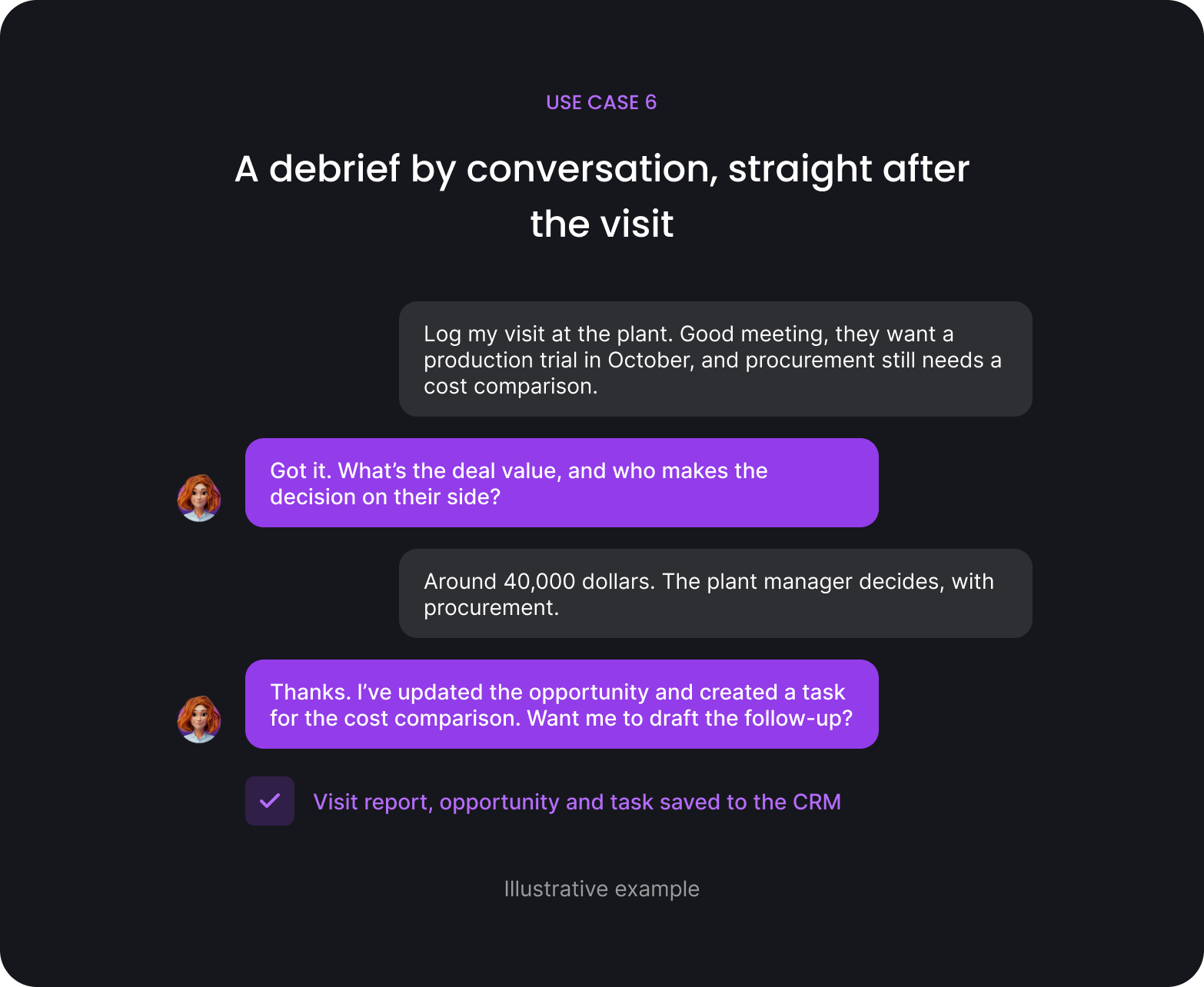
How to do it: define the fields a complete visit report needs; configure the AI to ask for anything missing; have the assistant call the rep within ten minutes of the meeting ending, based on the calendar.
Try it: "Log my visit at the plant. Good meeting, they want a production trial in October, and procurement still needs a cost comparison."
Measure: minutes from visit end to CRM and ERP update; share of reports with the outcome field filled.
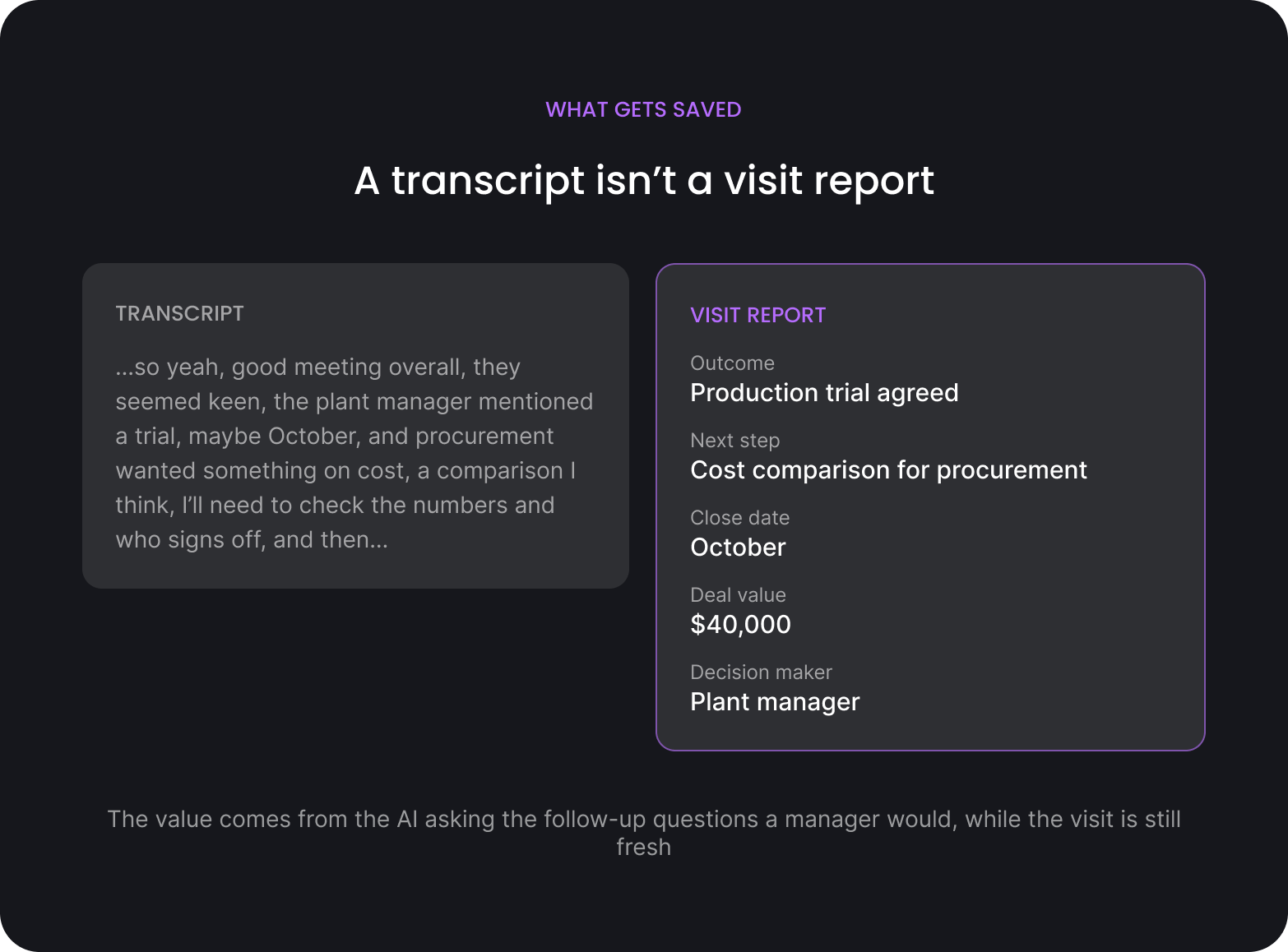
Watch out: a transcript isn't a visit report. A block of text still has to be sorted by someone. The value comes from the AI asking the follow-up questions a manager would, while the visit is still fresh. See how a debrief can capture every meeting, online or in person.
7. Keep the CRM complete without typing
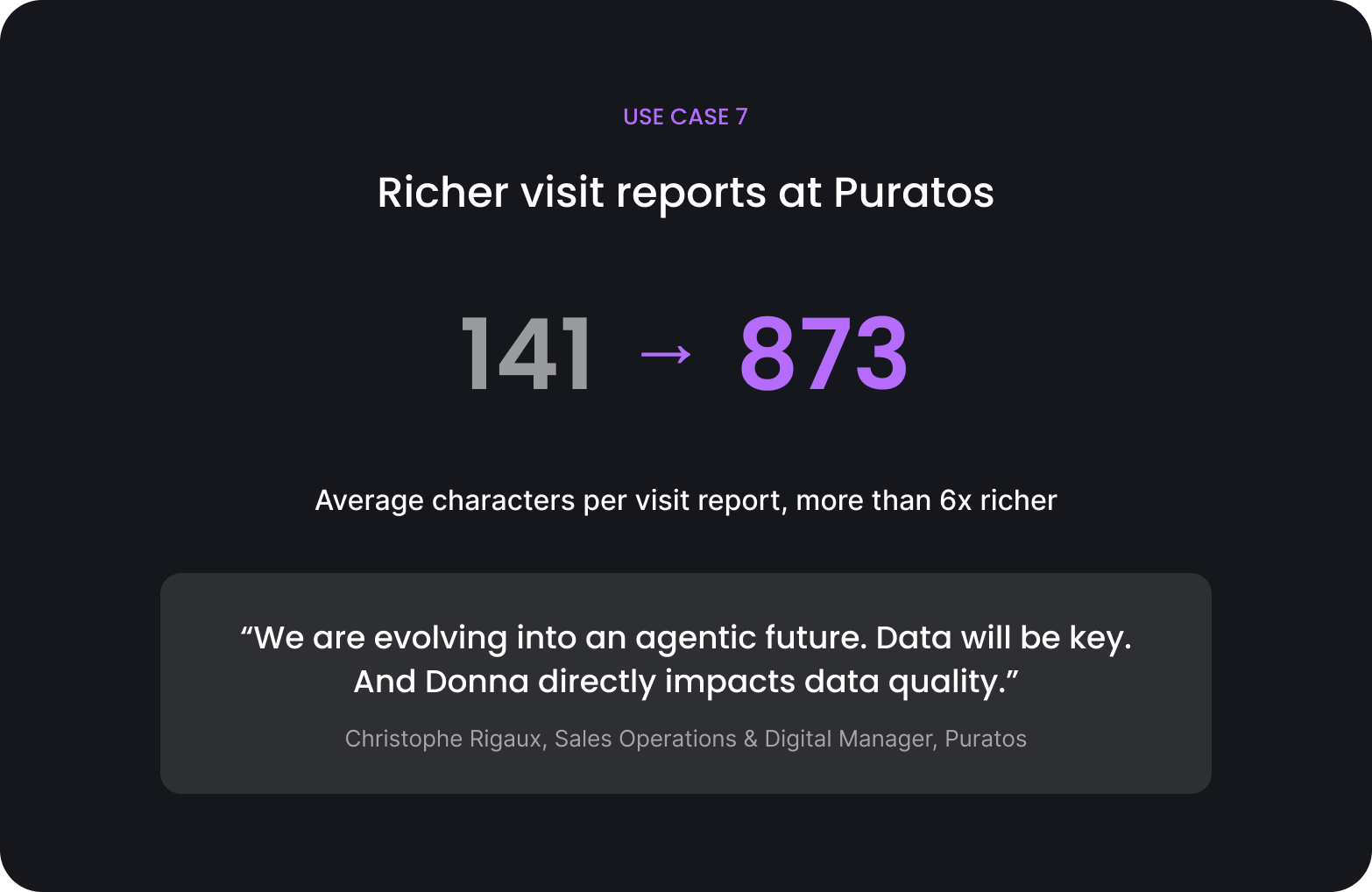
The debrief should end where the work happens: the visit report, opportunity, contact and task in the right CRM object and field, an ERP update where needed, and a drafted follow-up email. Because it happens minutes after the meeting, the detail survives. At Puratos, a Donna customer, the average visit report grew from 141 to 873 characters, more than six times richer. Christophe Rigaux, Sales Operations & Digital Manager at Puratos: "We are evolving into an agentic future. Data will be key. And Donna directly impacts data quality."
How to do it: map which objects and fields the AI may write to, including custom objects; respect existing user permissions; keep a human in the loop, with reps confirming anything material before it's saved.
Try it: "Create an opportunity for two pumps, about 17,000 euros, closing end of September, and a task for legal review by Tuesday."
Measure: outcome fill rate; average report depth; activities logged per rep per week.
Watch out: AI can mishear numbers and names. Keep a human in the loop: read back key values (amounts, dates, contacts) before they're written. This is how AI improves CRM data quality at the source instead of cleaning it up later.
8. Draft follow-ups with generative AI
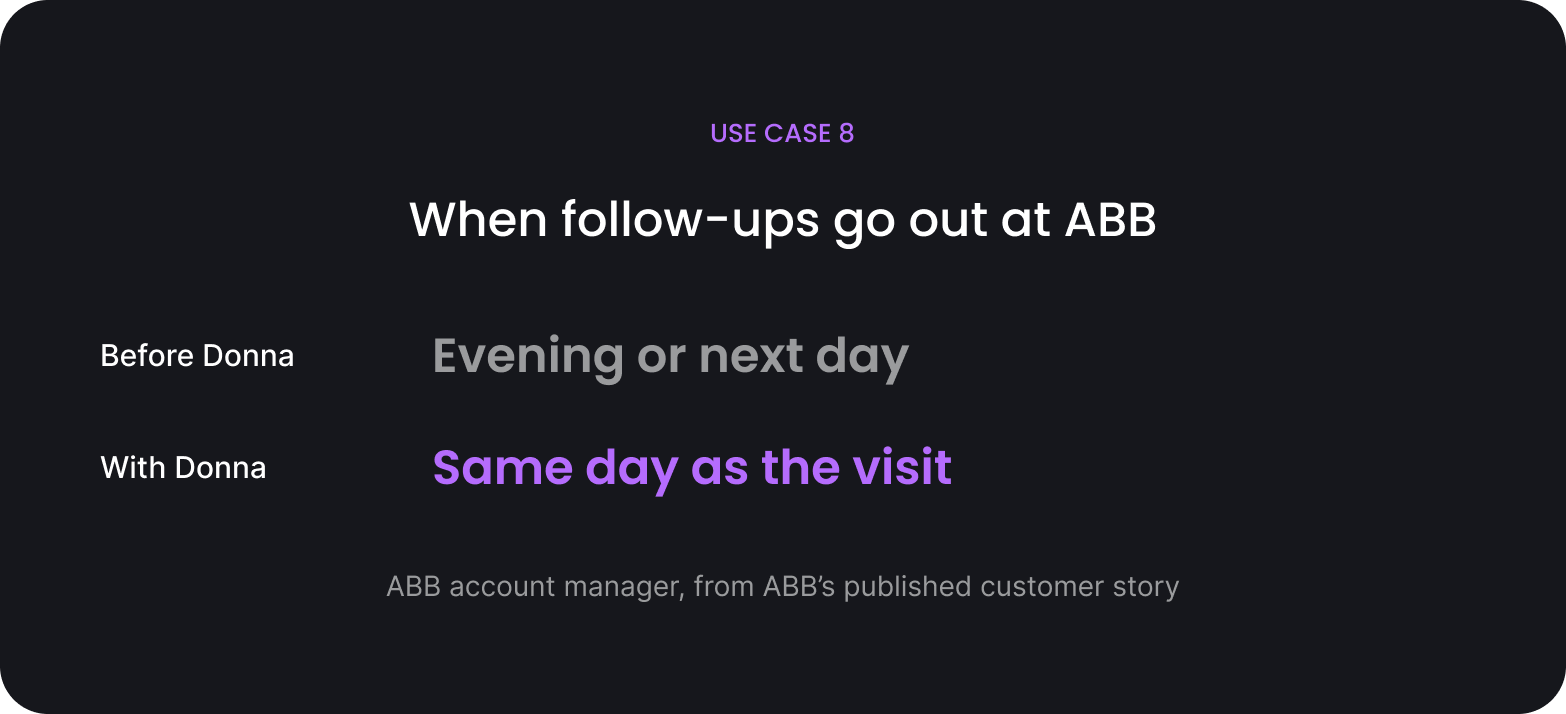
From the same debrief, generative AI can draft the follow-up email: a recap in the customer's terms, the agreed next step and meeting slots checked against the calendar. That's how AI leads to more personalized customer interactions without more typing. Sent the same day, it keeps the deal moving while the conversation is fresh for both sides. At ABB, where more than 100 users work with Donna, an account manager now sends follow-ups on the day of the visit instead of writing them up in the evening, and says customers notice the quality of the writing.
How to do it: generate the draft from the debrief; keep it short; have the rep review and send it the same day.
Try it: "Draft a short follow-up to Joe: summary, the two next steps with dates, and three slots next Tuesday morning. No fluff."
Measure: share of visits followed up within 24 hours; follow-up meetings booked.
Watch out: never auto-send. The rep's name is on it. More on automated sales admin.
9. Capture leads, business cards and handwritten notes on the go
Trade shows and site visits are where a lot of field lead generation happens, and they produce business cards, new names and scribbled notes. AI can turn a photo of a card into a contact on the right account, and a photo of handwritten notes into a structured record.
How to do it: photograph the card or notes; tell the AI which account they belong to; check the contact before saving.
Try it: "Add this card as a contact at the account I just visited and create a task to send her the product sheet."
Measure: event leads entered within 48 hours.
Watch out: duplicates. Make sure the AI checks for existing contacts first.
Across the team
These use cases close the loop. What field sales reps capture comes back to managers as pipeline signals and coaching, and to leaders as market insight, which shapes the priorities reps work on next.
10. Use AI for sales management: pipeline and deal risk
When field sales reps debrief after every visit, managers get a sales pipeline that reflects this week, not last month. AI for sales management builds on that: it flags stalled deals, slipped close dates and opportunities with no next step, before the forecast call and the weekly sales meetings. Gartner found sales organizations that give sellers AI-enabled next best actions are 2.6 times more likely to achieve commercial growth. At DPG Media, the number of opportunities entered in Salesforce rose markedly, largely because Donna asks after each visit whether there's an opportunity to log.
How to do it: define what "at risk" means for your process (no activity in 30 days, missing decision maker, overdue customer action); ask for a weekly summary; review it in the pipeline meeting.
Try it: "Which of my team's opportunities closing this month have no next step or an overdue customer action?"
Measure: forecast accuracy; share of opportunities with a dated next step.
Watch out: alerts nobody acts on become noise. Keep the list short. See proactive pipeline management.
11. Coach on evidence, not anecdotes
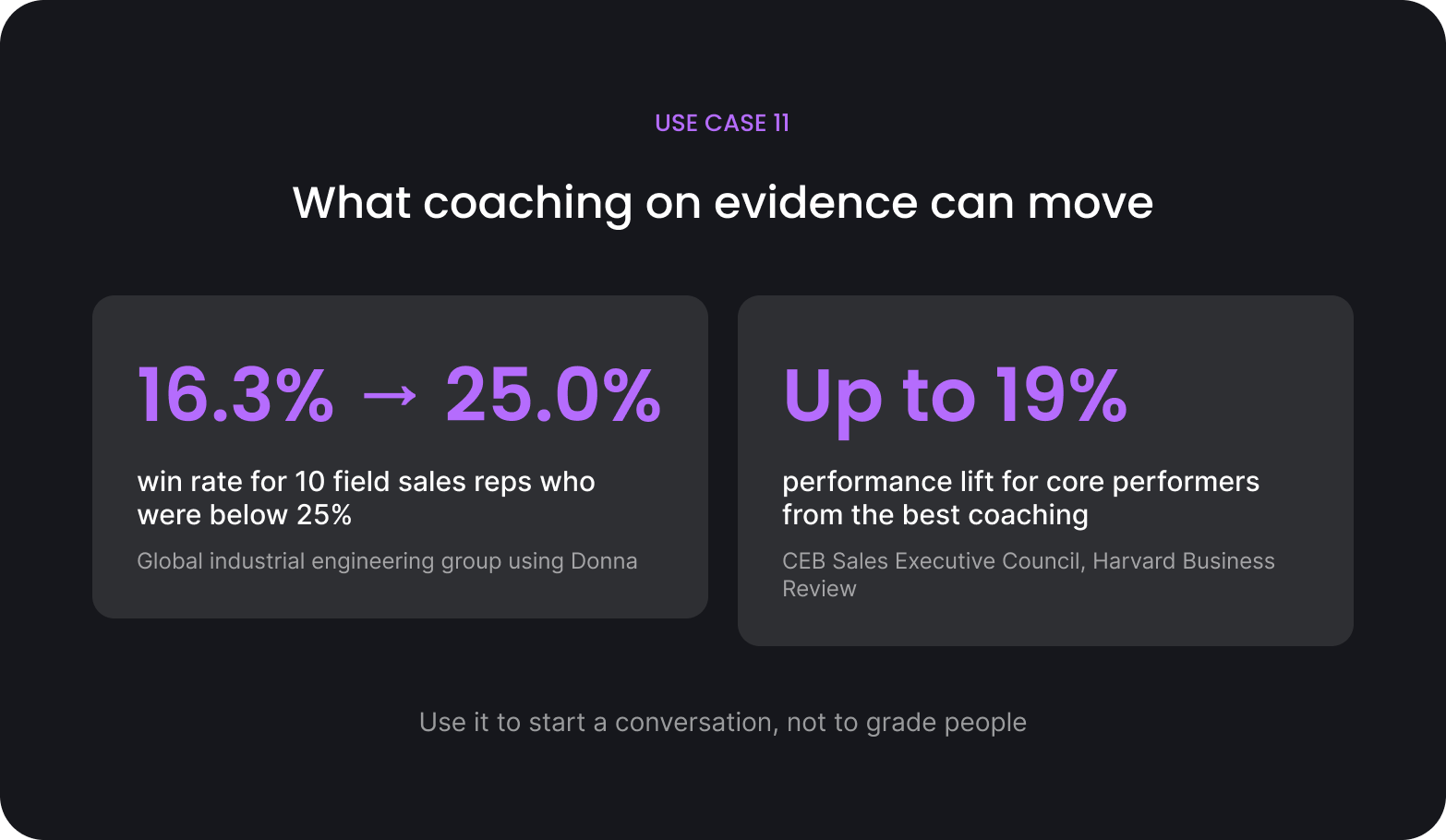
Managers can't ride along on every visit, yet coaching is the strongest lever they have. Research from CEB's Sales Executive Council, published in Harvard Business Review, found the best coaching lifts core performers by up to 19%. With debriefs in the CRM, AI can summarize a field sales rep's week and suggest what to coach on, so one-to-ones start from evidence. Coaching also happens on the go: right after a debrief, the AI can give the rep one or two pointers while the meeting is still fresh. At a global industrial engineering group using Donna, 10 field sales reps who were below a 25% win rate went from 16.3% to 25.0%.
How to do it: before each one-to-one, ask for a summary of the rep's visits, deals that moved and stalled, and patterns; pick one or two coaching points.
Try it: "I have a one-to-one with Sam in half an hour. Summarize his visits this week and suggest two coaching points."
Measure: win rate for reps below team average, before and after.
Watch out: use it to start a conversation, not to grade people. Reps who feel monitored stop debriefing honestly.
12. Use AI for sales and marketing: turn field conversations into market insight
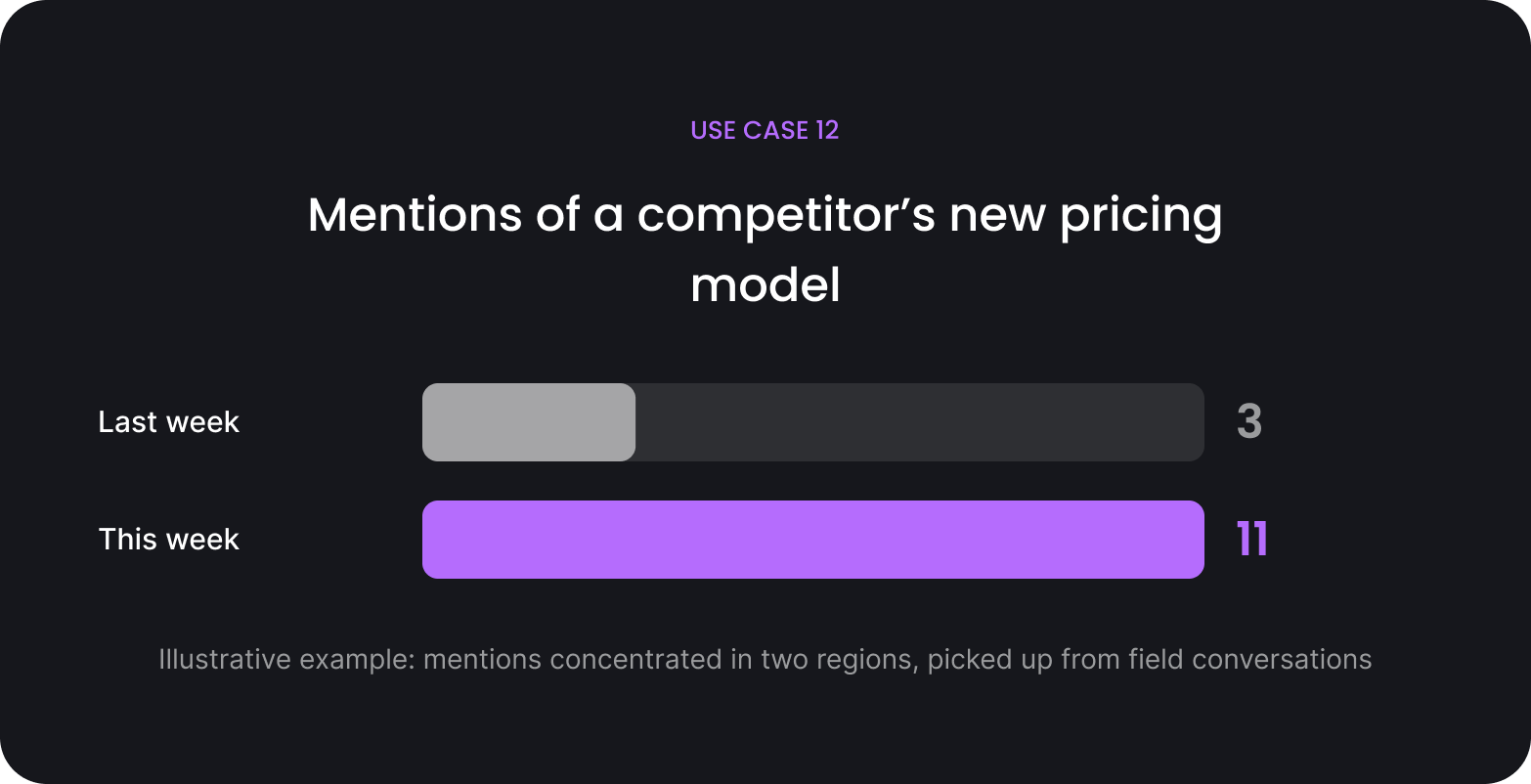
Field sales reps hear things no survey picks up: a competitor's new pricing, a recurring product request, a requirement nobody had named. AI for sales and marketing groups those mentions into themes, giving marketing teams valuable insights into customer behavior and buyer engagement that web analytics can't show. Illustrative example: a competitor's new pricing model mentioned in 11 conversations this week, up from 3 the week before, concentrated in two regions. ABB uses the same approach to bring together competitor mentions and the arguments that win business, and turns them into talk tracks based on real customer conversations.
How to do it: agree the themes to track (competitors, pricing, product requests, customer needs); make sure the debrief asks about them; share a weekly summary with marketing and product.
Try it: "What did customers say about competitors this month, and which regions mentioned them most?"
Measure: number of insights acted on by marketing or product per quarter.
Watch out: insight depends on volume and consistency. A few detailed reports beat many one-liners. See sales insights from every field conversation.
How to blend AI assistance with human sales efforts
More AI isn't automatically better. Gartner predicts that by 2028 AI agents will outnumber sellers ten to one, yet fewer than 40% of sellers will say agents improved their productivity. The difference is in how work is split between AI, field sales reps and their managers:
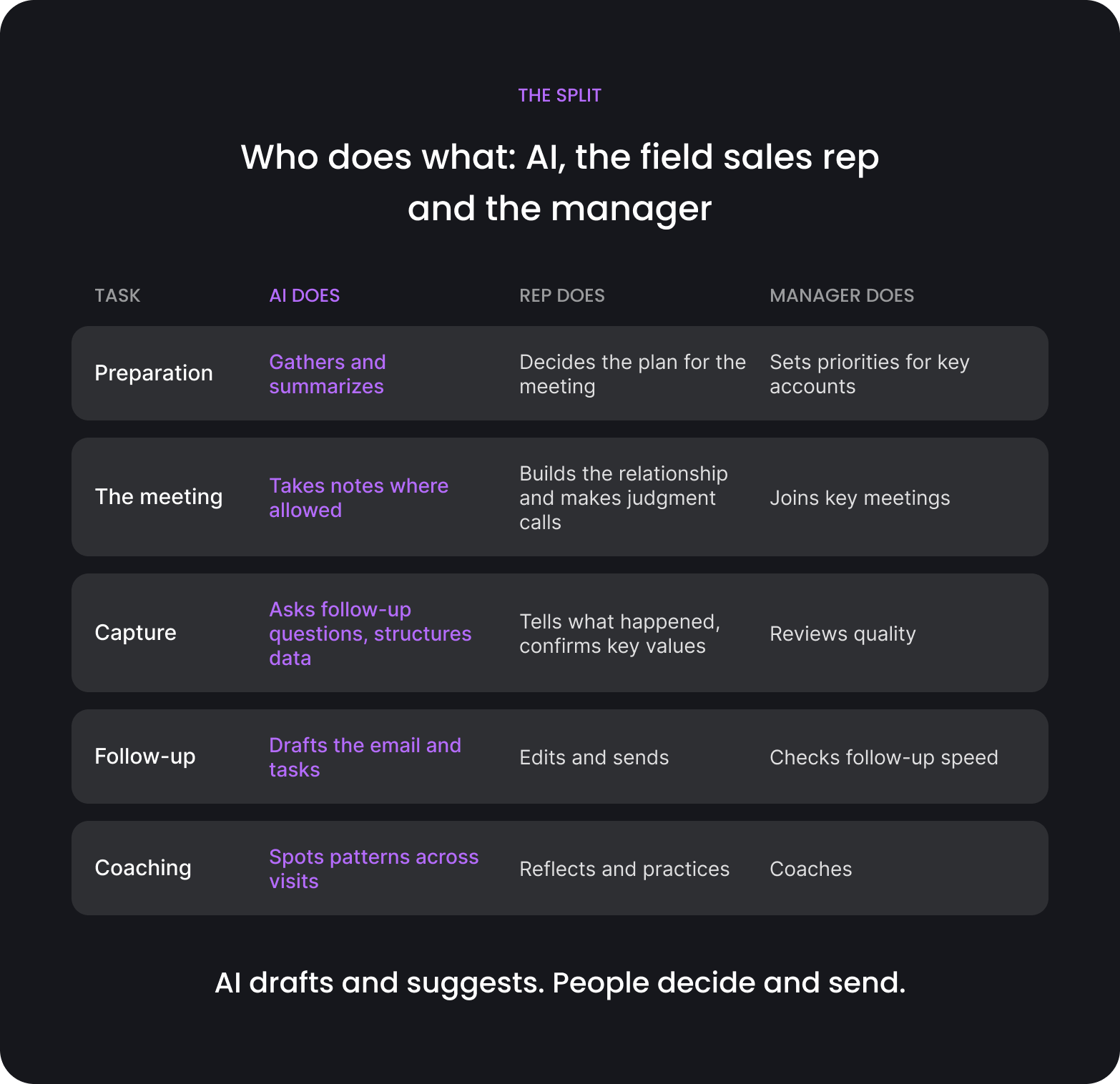
The rule of thumb: AI drafts and suggests, people decide and send, with a human in the loop for anything that reaches a customer, the CRM or the ERP. Repetitive sales tasks go to AI; relationships, judgment and closing deals stay with people. The split also works in both directions. Managers use what AI surfaces to coach and set priorities, and field sales reps take that guidance into the next visit. Better-led reps run better visits, better visits give leaders better information, and that's how efficient sales processes turn into sales growth.
Risks and limits of AI in sales
AI makes mistakes, and in sales those mistakes end up in front of customers or in the forecast. These are the ones to plan for:
- Wrong data in the CRM. AI can mishear a number or invent a detail. Read back amounts, dates and names, and keep a human in the loop for anything material.
- Bad data in, bad answers out. Gartner predicts that through 2026, organizations will abandon 60% of AI projects unsupported by AI-ready data. Fix capture before you build on top of it.
- Recording consent. Rules vary by country and US state: California requires the consent of all parties to record a confidential conversation, and the GDPR requires a lawful basis for processing. Debriefs after the meeting avoid recording the customer.
- Customer data in public tools. Pasting account details into a generic chatbot may breach your data policy. Use tools your IT and legal teams have approved.
- Tool sprawl. Every new app competes for attention. Prefer one assistant that covers several use cases through channels reps already use.
How to use AI assistants in sales: what to check
Use these questions when you compare AI sales assistants for a field sales team:
- Does it reach field sales reps proactively, before and after meetings without being opened?
- Does it ask follow-up questions, or only transcribe?
- Does it write to the right CRM objects and fields, including custom objects, with existing permissions?
- Does it work hands-free, offline and in your reps' languages, and can reps communicate how and when they like: text, voice, or call?
- Does it integrate with Salesforce, SAP Sales and Service Cloud V1 and V2, Microsoft Dynamics, HubSpot or another CRM you run, plus your calendar, email and other key business tools such as your ERP?
- Will your security team sign off (GDPR, ISO 27001, SOC 2, data hosting)?
For a wider view, see our guide to AI tools for sales teams and AI sales assistants for field sales teams.
From 12 use cases to one daily routine
You don't need twelve AI-powered sales tools to cover these use cases. Teams that get results start with the routine that feeds everything else, a briefing before each visit and a debrief after it, and add use cases once it sticks.
Donna is the only proactive AI assistant for field sales, built around that routine. She calls field sales reps before every meeting to prepare them, captures each visit in a short voice-to-voice conversation, handles CRM updates and follow-ups, and returns what she learns to managers as coaching moments and to the business as field intelligence. Teams at Puratos, ABB, DPG Media and Döhler already work this way, and Donna has been rolled out at hundreds of organizations across the globe.
Field sales reps communicate how and when they like – text, voice, or call – online or offline, and Donna integrates with Salesforce, SAP Sales and Service Cloud V1 and V2, Microsoft Dynamics, HubSpot or another CRM, plus your calendar, email and ERP.
See the AI assistant for field sales in action, or call Donna for a free walkthrough.
FAQs
How can AI be used in sales?
AI can take on most of the work around a customer conversation: planning the day, researching accounts, preparing meetings, capturing notes, updating the CRM, drafting follow-ups, flagging pipeline risk, supporting coaching and spotting market trends. For field sales teams, the use cases that pay off first are the briefing before a visit and the conversational debrief after it.
Where should a field sales team start with AI, without buying ten tools?
Start with one daily routine: a briefing before each visit and a debrief after it. That saves field sales reps the most time and creates the CRM data that coaching, pipeline reviews and market insight depend on. Add the next use cases once that routine sticks.
Our CRM already has AI features. Do we still need a separate AI sales assistant?
It depends on where your team works. CRM AI features are built for people working behind a desk, inside the customer relationship management system, and they're useful there. Field sales reps spend most of their day in the car and at customer sites, often without opening an app. An assistant built for field sales reaches them at those moments and writes the results back to the CRM, so the two work together.
Can field sales reps just use ChatGPT or another general AI assistant?
For general questions, yes, but not for customer work. A general assistant doesn't know your accounts, calendar, playbook or CRM fields, and it won't contact a rep before the next meeting. Pasting customer details into it may also break your data policy. Use an assistant your IT and legal teams have approved, and check where data is hosted, whether it's used to train models, and whether the vendor meets GDPR, ISO 27001 and SOC 2.
Do customer meetings have to be recorded for AI to work?
No. A short debrief straight after the meeting captures what happened without recording the customer. Recording is useful for online meetings, but in person it needs consent, and the rules vary: California requires the consent of all parties, and the GDPR requires a lawful basis for processing.
How do we know whether AI is working for our field sales team?
Measure against a baseline. Donna has been rolled out at hundreds of organizations across the globe, and the approach is the same each time: record your starting numbers, then track adoption, time from visit to CRM update, follow-up speed and win rate by rep segment. Hours saved only count if they turn into more visits or better results.
Will AI replace field sales reps?
No. In complex B2B sales, the relationship and the judgment in the room stay human. AI takes over the preparation and admin around each visit, so field sales reps spend more time with customers and arrive better prepared.
Related articles
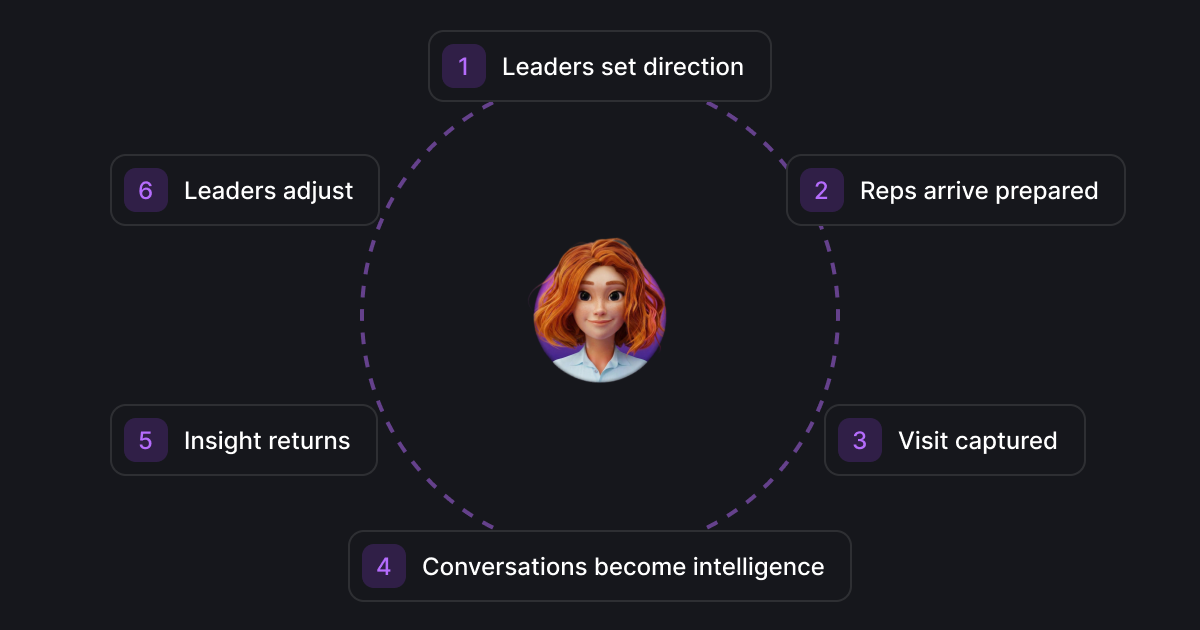
Field sales automation has five layers: plan and route, track and verify, prepare, capture and convert, and act on insight. Most tools stop at the first two. AI has changed the last three. Saving time is where it starts, not the result. Gartner found AI saves sellers 4.8 hours a week, yet 72% of sales organizations don't reinvest that time in high-value work. The biggest gains come from a loop: leaders shape what field sales reps do, and what reps hear in the field shapes how leaders coach, prioritize and plan. Start with capture, not tracking. Clean data from every visit feeds briefings, coaching, forecasts and field intelligence. Choose software on whether insight gets back to the rep, the manager and the business, not on feature count.
Sales

Microsoft Dynamics 365 gives field sales teams a secure, mobile friendly CRM that centralizes account history, opportunities, and activities so reps can prepare fast, log visits, and keep managers aligned. The challenge is manual data entry during hectic days on the road, which leads to late or incomplete updates and weakens forecasting, coaching, and follow up quality. Use the Dynamics 365 mobile app, Outlook, and Teams to prepare for meetings, capture visit notes, and manage next steps in real time. Keep workflows simple with standardized stages, next step fields, and weekly pipeline reviews to maintain clean, consistent data. Layer proactive AI like Donna on top of Dynamics 365 to auto capture notes, update opportunities, and draft follow ups so reps cut admin and leaders gain reliable visibility.
Sales

Modern field sales reps must manage complex buying groups across industries, which stretches cycles and creates heavy CRM admin. This article explains how to identify decision makers early, keep messages consistent across meetings, and maintain organized stakeholder maps without overwhelming reps on the road. Map economic, technical, legal, compliance, and end user roles early, then keep that map current in your CRM. Capture decisions, objections, and next steps immediately after each visit to avoid misalignment and lost trust. Use a simple, repeatable system for prep, note capture, and follow-up to improve CRM adoption and forecast accuracy. Automated, voice-driven assistants like Donna reduce manual admin, enrich data quality, and help field teams scale consistent stakeholder management.
Sales
Talk to Donna today
Discover how Donna can simplify life for field sales teams


FAQs
Got questions? Donna got answers. Here’s what field sales teams ask most.
Is it legal to record online and offline customer conversations with Donna?
Yes, in most cases, as long as the applicable notice and consent requirements are followed. Recording laws vary by jurisdiction, so the key principle is to be transparent with participants and obtain consent where required. Donna includes controls to support this.
How does Donna use AI?
Donna combines different AI models to deliver a seamless experience, allowing users to text Donna, call Donna, or send voice notes. Donna uses AI to transcribe meeting recordings, help prepare meetings, generate summaries, capture and surface insights and propose or automatically perform actions such as updating the CRM, scheduling a follow-up meeting, or preparing a follow-up email.
Is customer data used for AI model training?
No. Customer data is never used to train or improve our or third-party AI models.
What is Donna and how does she help field sales teams?
Donna is a proactive AI assistant for field teams delivering hyper-personalized briefings, capturing every detail, and killing the admin time. She helps sales reps save time by preparing meetings, taking notes, updating the CRM, and drafting follow-ups automatically. With Donna, sales teams spend less time on admin and more time selling. Faster execution, stronger CRM adoption, and more wins, without longer hours. Happier, sharper teams start today with Donna.
Does Donna take notes during meetings automatically?
Yes. Donna listens, online and in person, to your meetings or calls, captures key points, and structures them into clean notes. Everything is stored and ready for review, so you can stay focused on the customer instead of typing. If you are not comfortable having a notetaker in your meeting, you can always update Donna afterwards.
Can Donna really update my CRM for me?
Absolutely. Donna automatically updates or creates contacts, opportunities, prepares quotes in your CRM and drafts follow-up mails. All data stays accurate and up to date without manual entry.
What tools and CRMs does Donna integrate with?
Donna integrates with Salesforce, SAP, Microsoft Dynamics 365, Outlook, Google Calendar, and more. Even if your CRM includes custom objects and fields, Donna connects seamlessly to keep everything in sync. Find all integrations here.
How much time can sales reps save by using Donna?
Sales teams typically spend less time on admin by 75%. By automating meeting prep, note-taking, and CRM updates, Donna helps reps reclaim time to focus on customers and close more deals.
Is Donna secure and GDPR-compliant?
Yes. Donna is ISO 27001 certified and fully compliant with GDPR, CCPA, and SOC 2. All data is encrypted in transit and never used to train AI models.
Our CRM is customized. Can Donna handle this?
Yes. Donna works with both standard and custom CRM objects and fields. Whether your setup is simple or highly customized, Donna connects seamlessly and keeps all your data accurate and up to date.
How is Donna different from other AI sales tools?
Donna’s purpose is built for field sales. Unlike generic AI assistants, Donna connects with your CRM, captures meeting notes, and updates contacts and opportunities automatically, even on the go. As Donna is deeply integrated into the day-to-day of field sales teams, she delivers a proactive, voice to voice and hyper-personalized experience.
How long does it take to set up Donna?
Users can start having conversations with Donna from day 1 and having your full team live on your workflows from week 3.